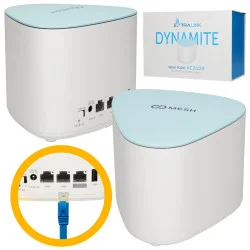
One fast Wi-Fi network in the whole house thanks to Extralink Dynamite C21
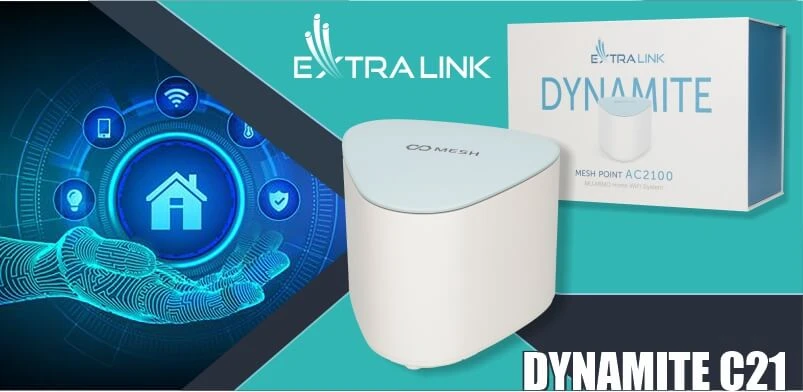
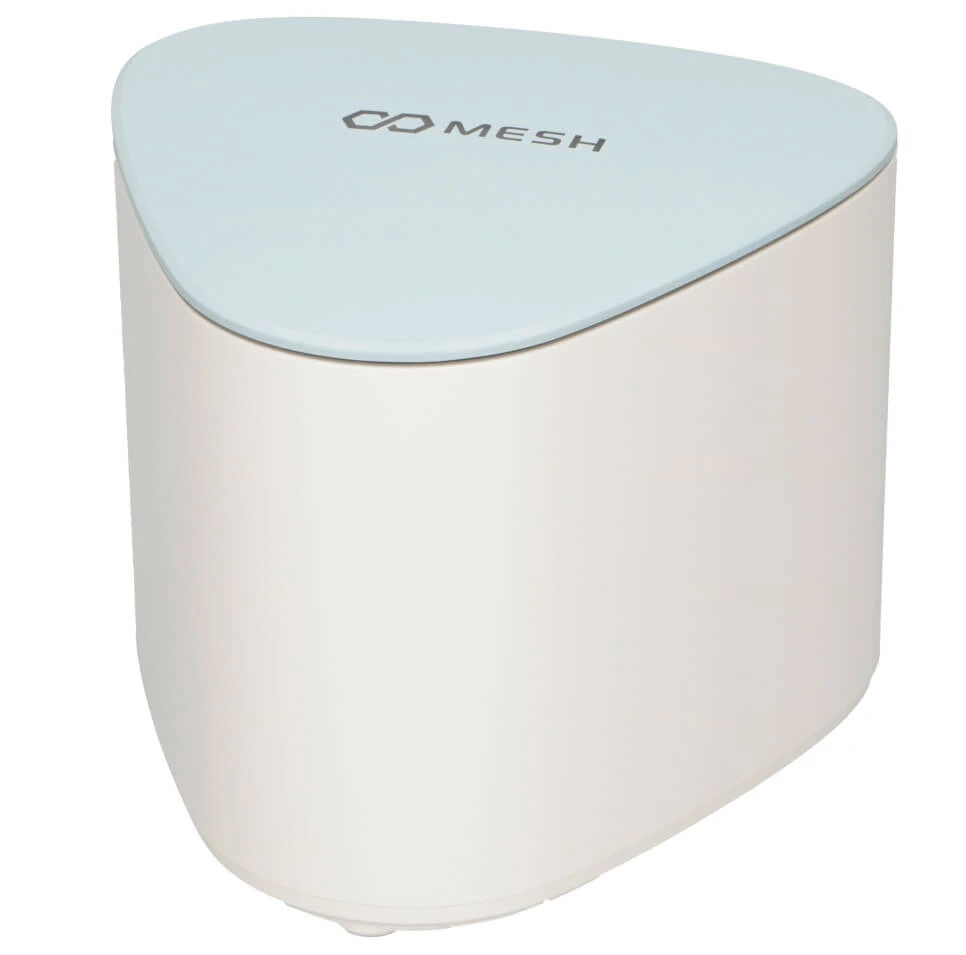
Extralink Dynamite Mesh Point C21 is both an Access Point and a WiFi signal amplifier, it can also serve as a multifunctional router. Made from good quality plastic, mostly in an universal white color which, along with its stylish shape, makes it fit into any interior. Extralink Dynamite Mesh C21 was designed to provide excellent WiFi signal in the house, the garage, and even outside, without having to switch between different devices and wireless networks with varying signal strengths.
Extralink Dynamite C21 specifications and features
Extralink Dynamite Mesh Point AC2100 is designed to work in two bands: 5GHz and 2.4GHz, with the maximum speed indicated by the manufacturer being 300Mbps in 2,4Ghz and 1733Mbps for 5Ghz. The manual that comes with the device mentions that it has six internal antennas, which provide good coverage, has the WPA/WPA2 MIX, WPA-PSK and WPA2-PSK security measures, updates automatically, and has the ability to shape the signal beam (beamforming) which improves performance. The device is designed to create and expand wireless MESH networks by adding satellite devices, and further expanding the network by setting up additional stations is child's play.
Pairing is done by:
1. using the Pair 2S pairing button, which you will find on the device next to the others
2. adding the 5Gmac address of the device to the configuration system (the easiest and fastest method).
In addition, Extralink Dynamite mesh point C21 has a function to quickly add users - guests. For this purpose, it is equipped with a TouchLink button (sensor button located on the outside of the casing). To quickly add a new user, touch the device at the activation point (indicated on the device by an appropriate description) and then in the wi-fi networks on your mobile device (only works for mobile devices), select the network ending in Touch and connect to it.
Pairing is done by:
1. using the Pair 2S pairing button, which you will find on the device next to the others
2. adding the 5Gmac address of the device to the configuration system (the easiest and fastest method).
In addition, Extralink Dynamite mesh point C21 has a function to quickly add users - guests. For this purpose, it is equipped with a TouchLink button (sensor button located on the outside of the casing). To quickly add a new user, touch the device at the activation point (indicated on the device by an appropriate description) and then in the wi-fi networks on your mobile device (only works for mobile devices), select the network ending in Touch and connect to it.
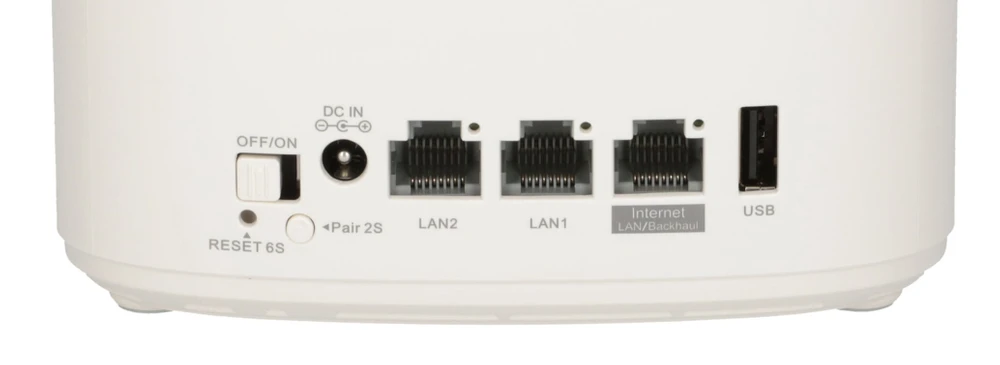
On the device you will find buttons such as: power on/off, reset, pairing, power input, and also two Lan ports (so that devices in the Mesh network can connect to each other not only through Wi-Fi but also through Lan ports) and one Lan port described for connecting the Internet, and a USB type A input.
Scope of supply of the device and connection possibilities
Upon opening the very good looking compact package we find:
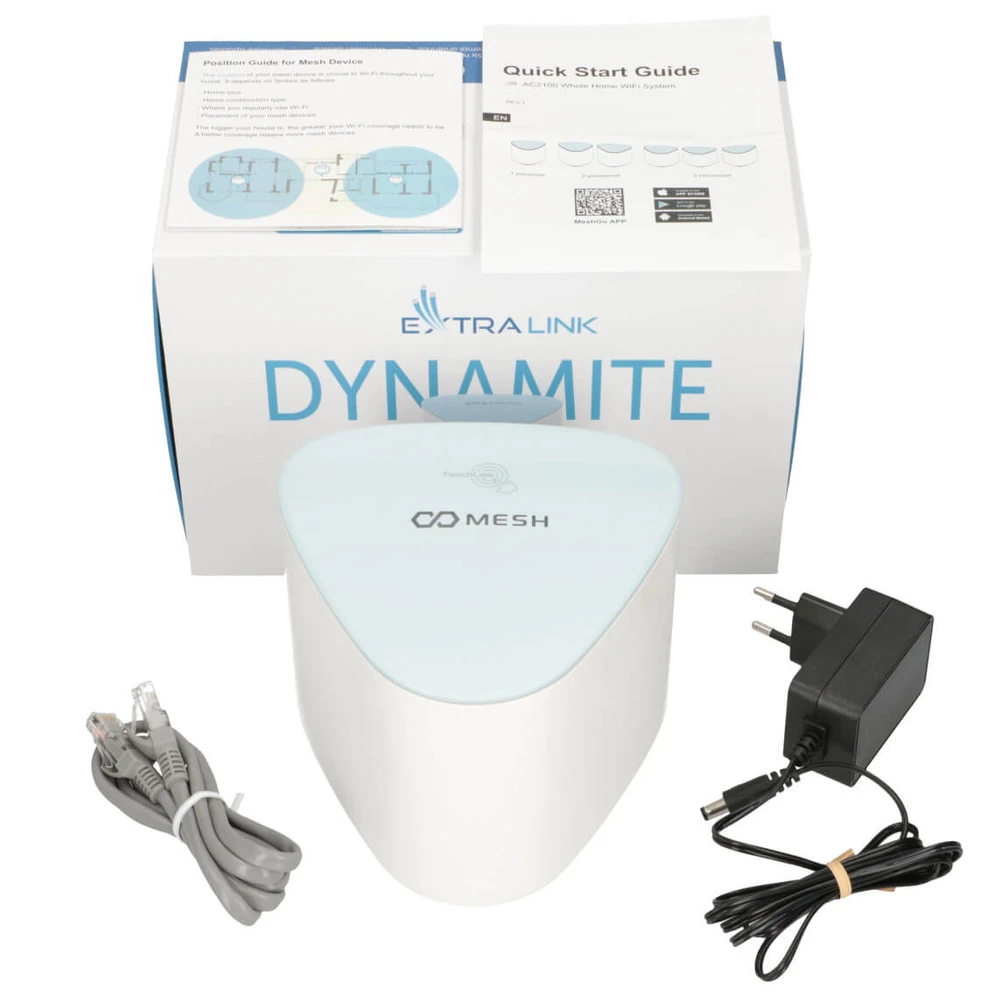
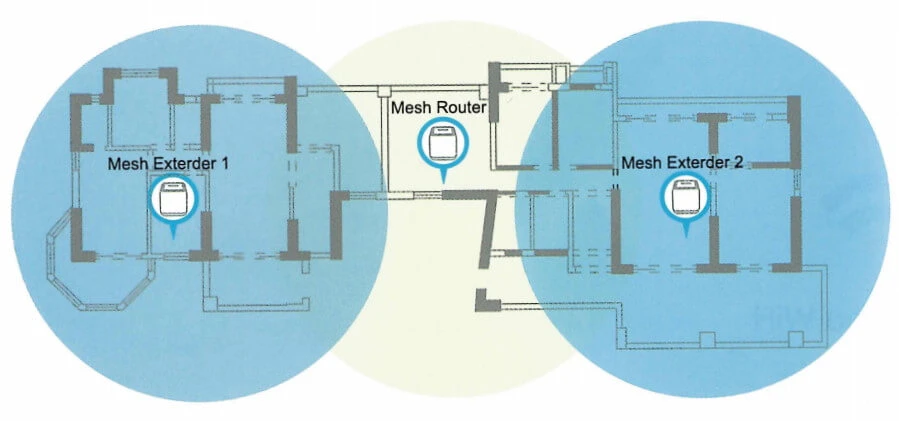
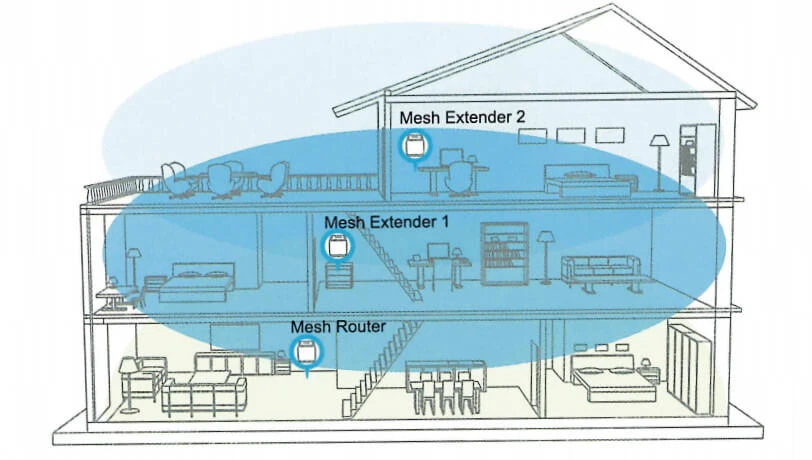
The manufacturer recommends that the devices in Mesh mode should be placed no further apart from each other than a maximum of two rooms and we have to take into account several factors, including the thickness and material of the walls separating these rooms. It is even graphically illustrated in the manual:
Device placement options
Device placement options
Home deployment option
Connection and configuration of Extralink Dynamite C21
We can control the Extralink Dynamite C21 access point via mobile devices such as smartphones or tablets. The commissioning process is extremely simple, a simple wizard allows you to configure the device for the first time. The device is easy to configure by installing the Mesh APP application, by downloading it or scanning the QR code from the store:
Beforehand, we connect our device to the Internet (Lan Internet port) and plug the power supply in:
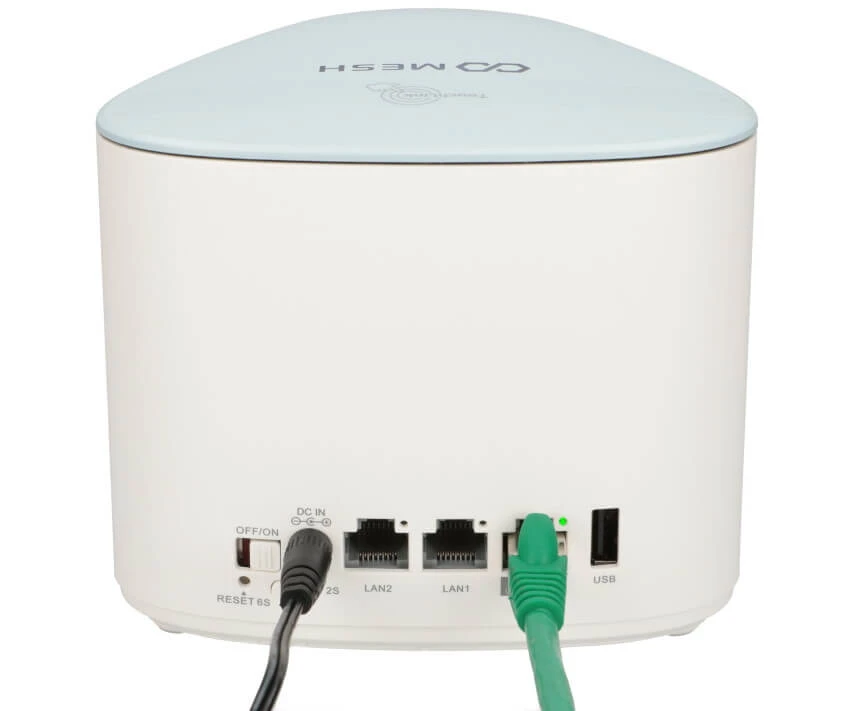
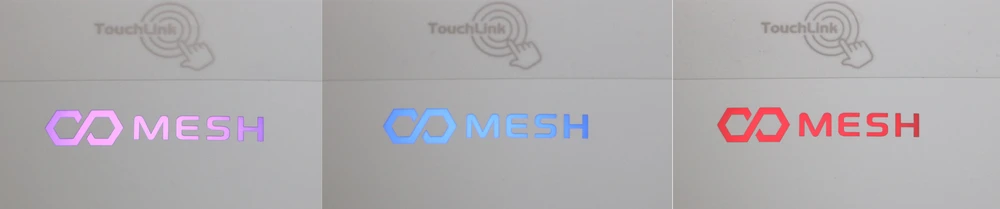
At first, a pink and purple icon will light up on the outside of the device, and after a while it will light up blue when connected to the internet. If the cable is not connected, or there is no internet, the MESH icon will flash red.
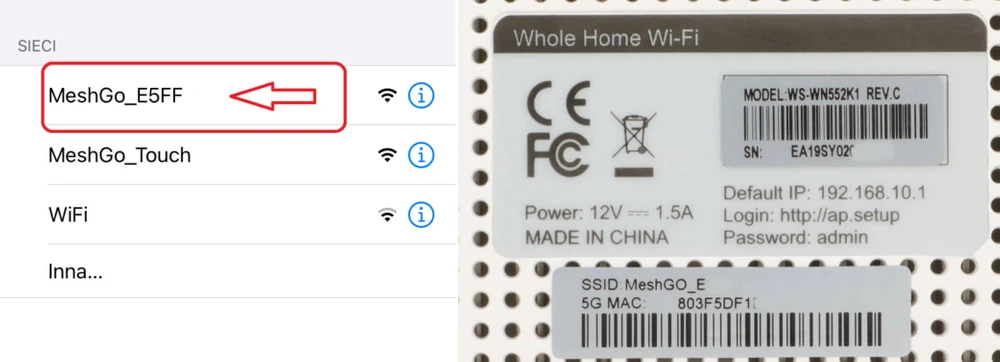
The app will connect to our device. It will show under the names MeshGo_Touch and MeshGo_SSID of the device. We choose the one with the SSID (although the manufacturer does not make this clear in the manual). The SSID can be found on the underside of the device, along with the configuration data for both the browser and the app.
In different tabs of the application we can set all other parameters of the device.
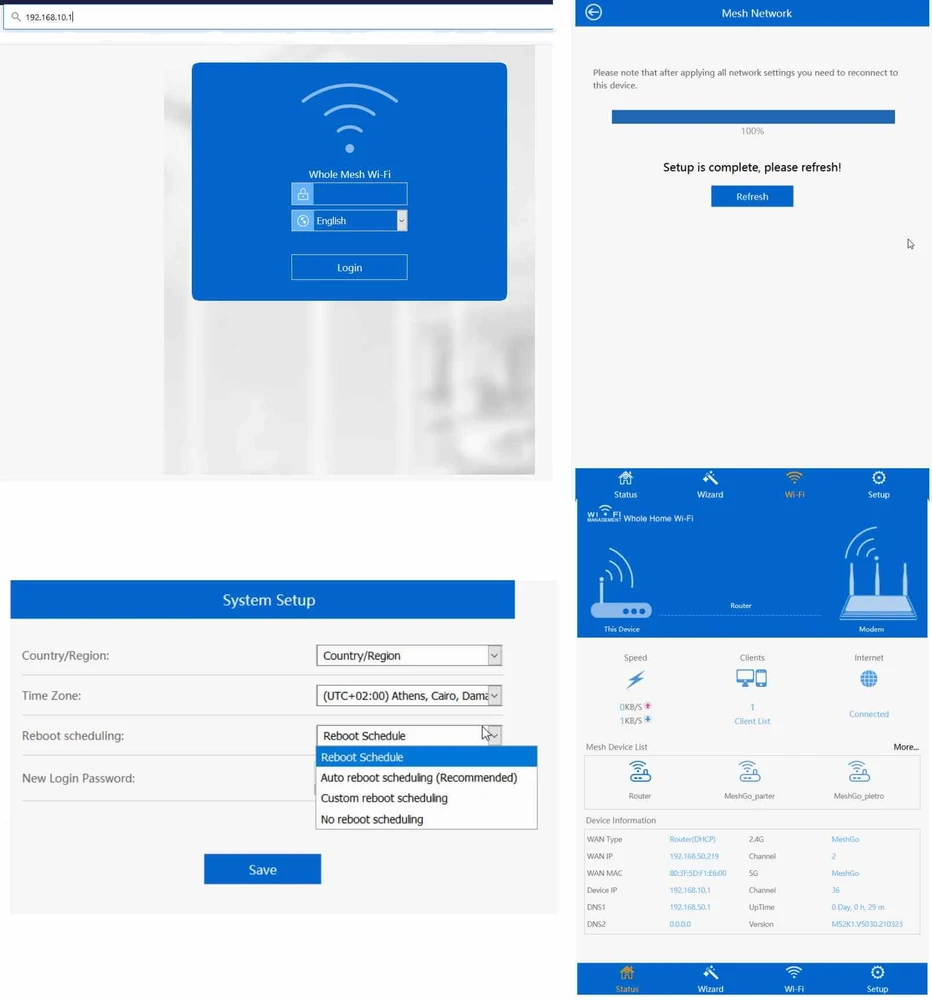
One of the first tabs is the one where you can select the function of your device (there's nothing in the manual about which device to select first in the Mesh setup process). So we chose Mesh Network
One of the first tabs is the one where you can select the function of your device (there's nothing in the manual about which device to select first in the Mesh setup process). So we chose Mesh Network
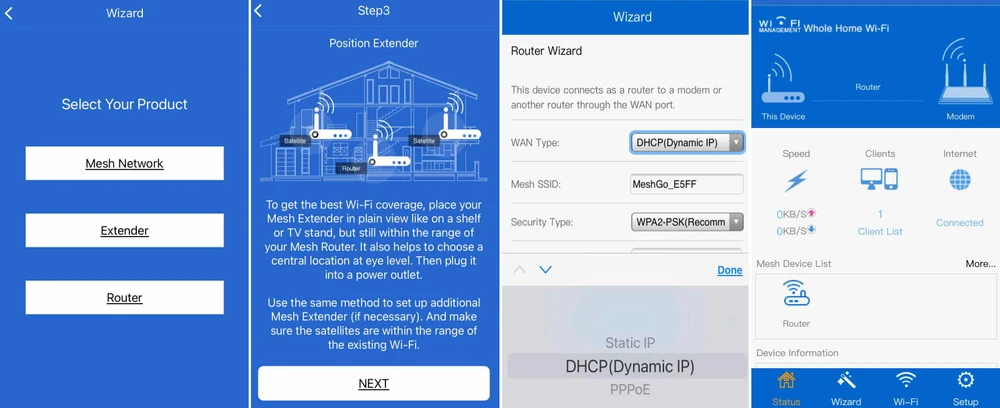
Despite the fact that the application informs us that our device connects as a router via the wan port on the device we have ports only described as lan or internet, which may cause some confusion.
Configuration of the device can be done also in a very easy way e.g. with a laptop or computer and logging on to 192.168.10.1, remembering about the password: admin
The configuration wizard is the same on both the website and the app.
Configuration of the device can be done also in a very easy way e.g. with a laptop or computer and logging on to 192.168.10.1, remembering about the password: admin
The configuration wizard is the same on both the website and the app.
To pair the devices connect them to power and one by one add their 5G mac addresses, which can be found on the label on the bottom of the device (best and fastest way to connect them), or directly pair them by using the Pair 2S button (devices are very hard to add this way).
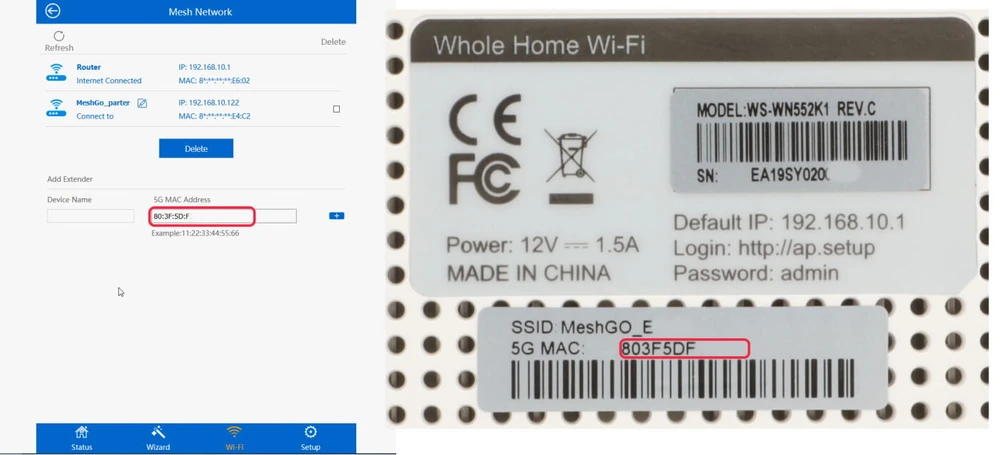
In the Wi-Fi configuration tab, select Mesh Network and enter the mac addresses of the Mesh network device there. Whichever way you choose to pair them, the MESH LED on the device should flash blue, wait about 30 seconds until the LED turns solid blue, then we can assume that the devices have established a connection. However, it is best to check each time through the application or the browser if the devices are connected.
After pairing and deploying the devices (it's easier to pair and set everything up before putting the devices in target locations of the house, which is also the way the manufacturer recommends doing it).
After pairing and deploying the devices (it's easier to pair and set everything up before putting the devices in target locations of the house, which is also the way the manufacturer recommends doing it).
What are the test conditions for Extralink Dynamite C21?
We tested the MESH system of the Extralink Dynamite C21 for WiFi capabilities, throughput and network coverage. This is another test in a series conducted under similar conditions. We tested the signal range in a two-story building with a basement, as well as the actual data rates available. The conditions we defined for the WiFi tests are similar for each of the network devices tested so far. This allows us to compare their results in a reasonably meaningful way.
We used AirSurvey software to make a signal map. For correct reading of signal levels please pay attention to the color legend at the bottom of the picture.
The placement of the devices is marked with an icon. The device on the "ground floor" at measurement point 1 was connected to the switch via a Ethernet 1Gbps port.
We used AirSurvey software to make a signal map. For correct reading of signal levels please pay attention to the color legend at the bottom of the picture.
The placement of the devices is marked with an icon. The device on the "ground floor" at measurement point 1 was connected to the switch via a Ethernet 1Gbps port.
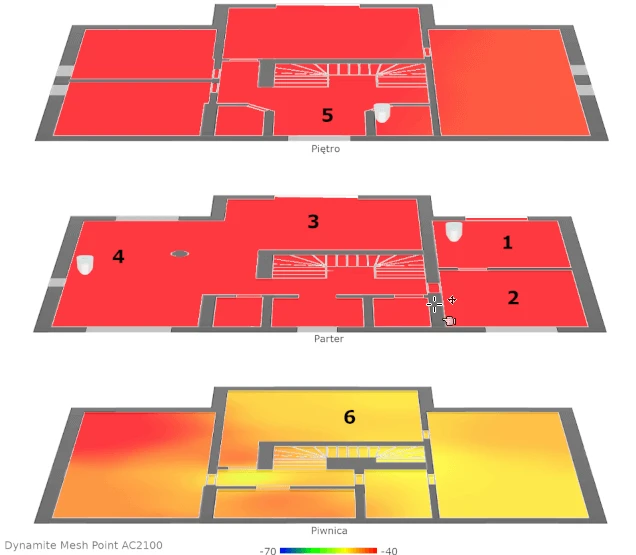
WiFi connectivity tests in MESH Extralink Dynamite C21
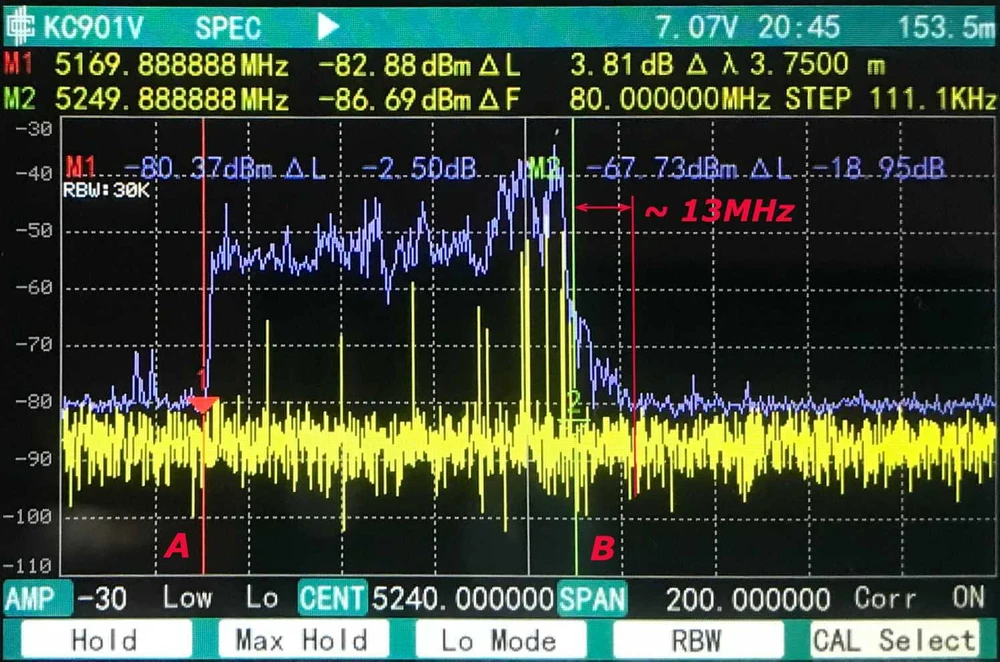
The WiFi transmitter module in the 5 GHz frequency according to the analysis operates in a manner deviating from the expected. The results of the measurement made by RF spectrum analyzer are disappointing. The device strongly exceeded (by as much as 13MHz) the preset channel width.
The device will interfere with other Wi-Fi networks. The problem can be solved by software updates.
The device will interfere with other Wi-Fi networks. The problem can be solved by software updates.
Before testing speed, we verified the maximum performance of the LAN and iperf3 server. The aforementioned laptop was connected via a 10/100/1000Mbps network card to a switch. We obtained the following maximum speeds for a single TCP stream: download 894Mbps, upload 958Mbps.
The devices in the Mesh network (MeshGo_parter ; MeshGo_floor) were connected to each other in mesh mode only, i.e. wirelessly only.
The boot process was smooth.
Test Point 1 - Download 708.51 Mbps / Upload 637.36 Mbps
The devices in the Mesh network (MeshGo_parter ; MeshGo_floor) were connected to each other in mesh mode only, i.e. wirelessly only.
The boot process was smooth.
Test Point 1 - Download 708.51 Mbps / Upload 637.36 Mbps
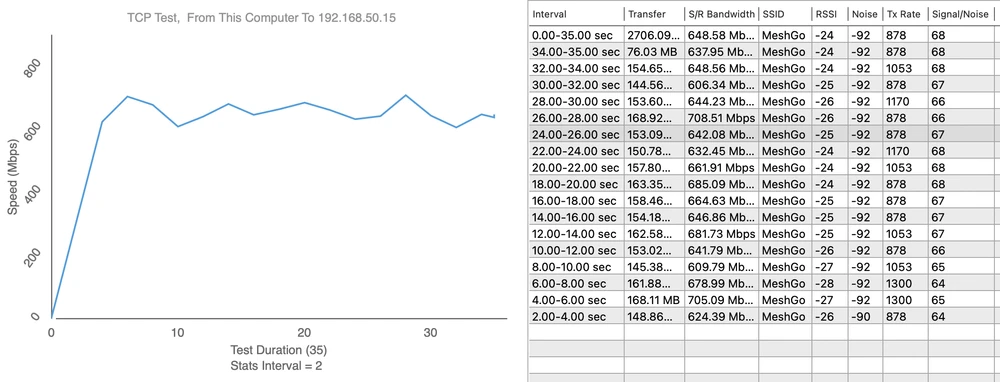
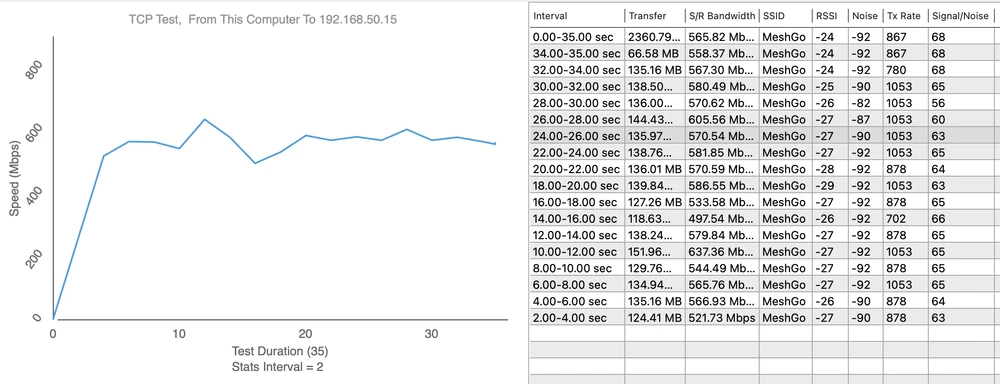
Measurement point 2 - Download 707.46 Mbps / Upload 580.54 Mbps
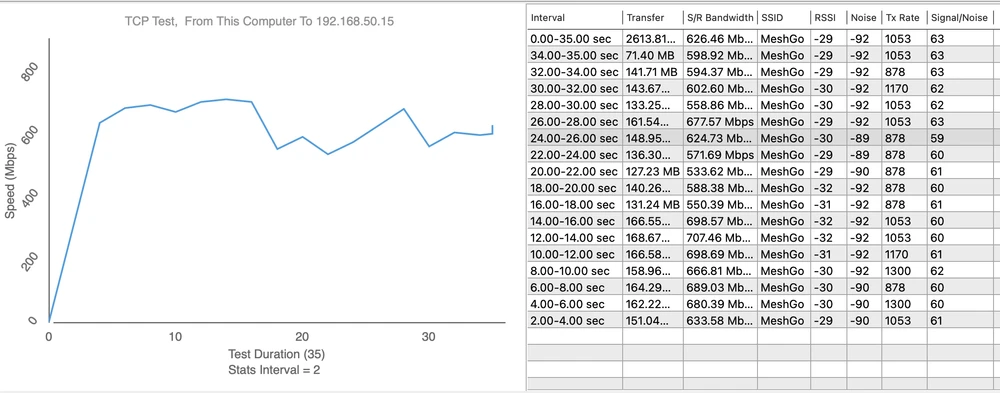
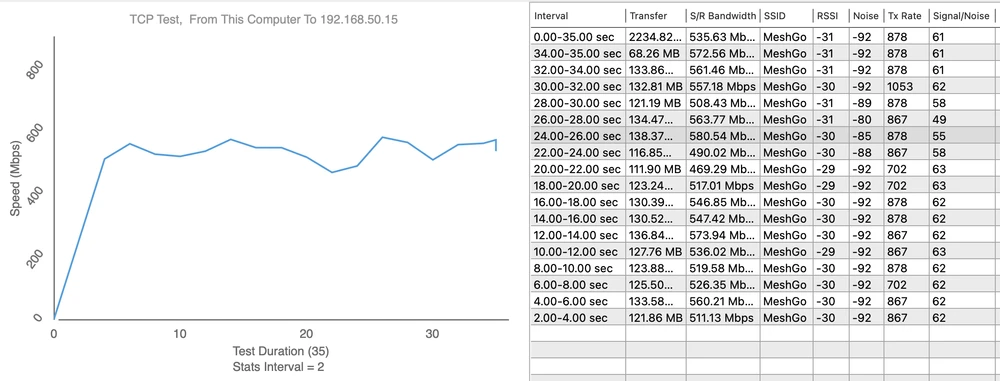
Measurement point 3 - Download 657.74 Mbps / Upload 372.19 Mbps
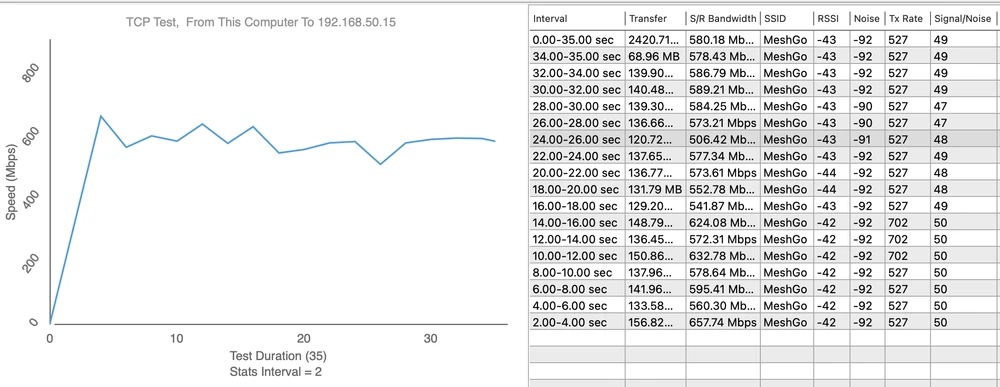
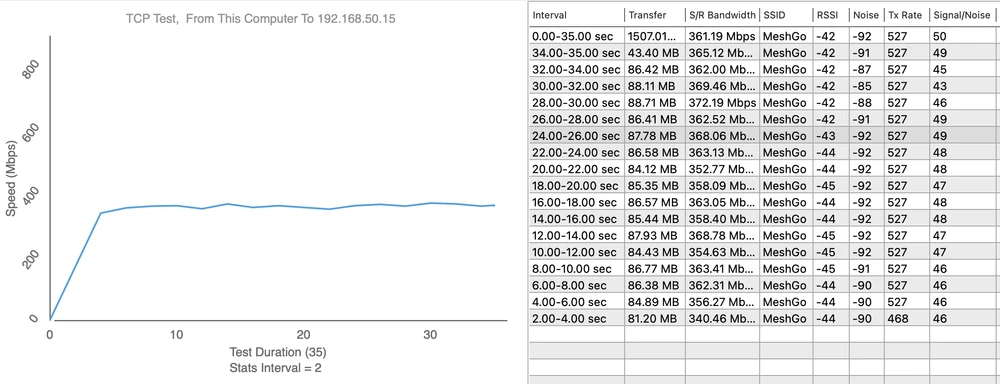
Measurement point 4 - Download 518.80 Mbps / Upload 241.07 Mbps
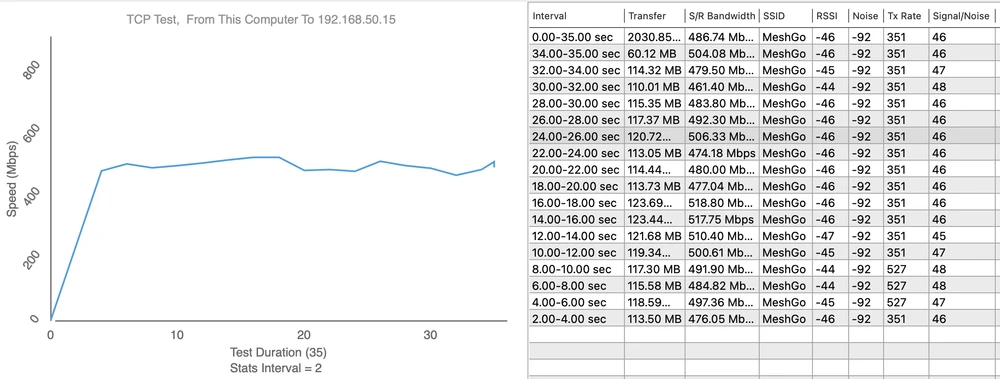
Measurement point 5 - Download 112.41 Mbps / Upload 159.85 Mbps
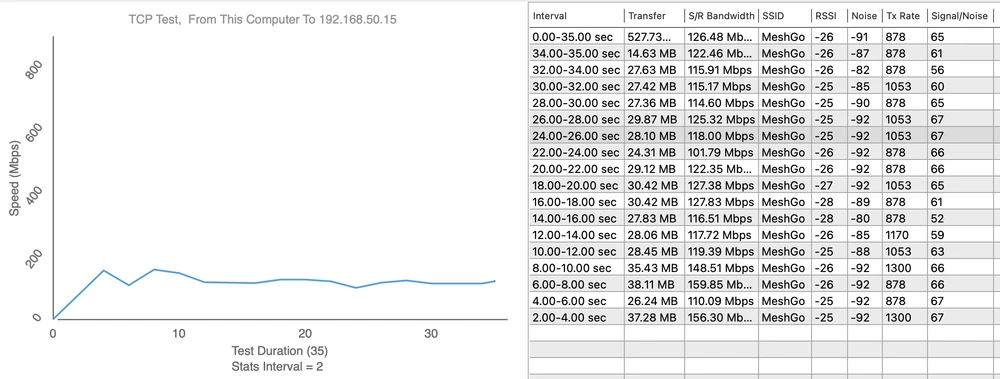
Measurement point 6 - Download 189.86 Mbps / Upload 63.24 Mbps
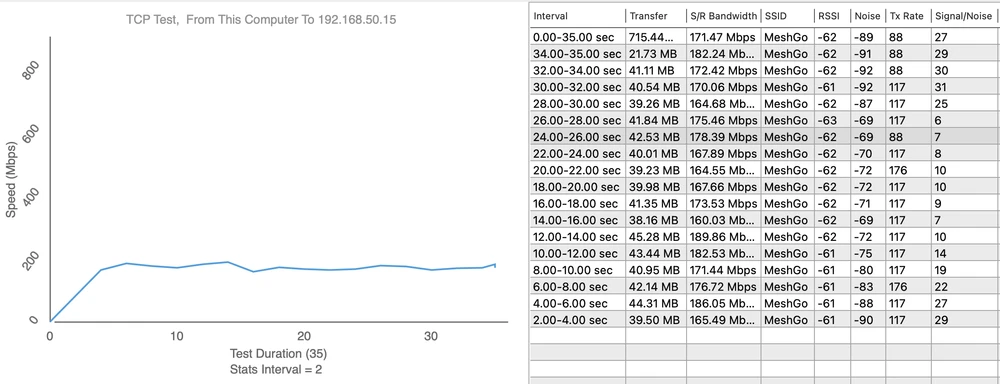
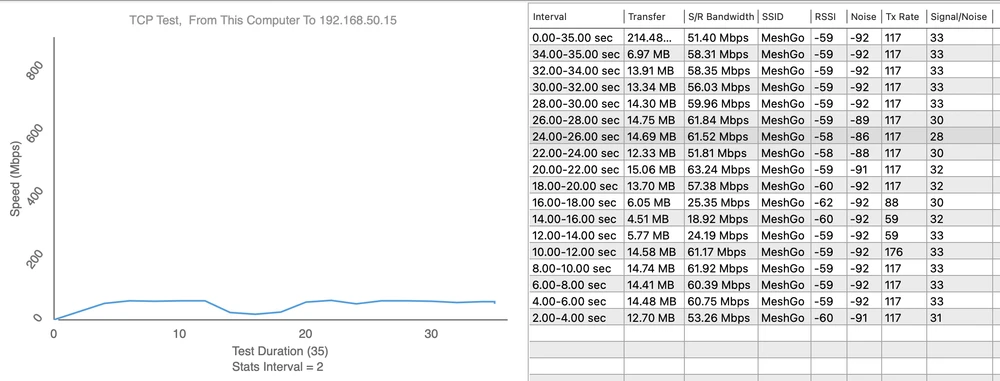
Notes: the devices were separated by a distance of about 10m and a thick load-bearing wall and a thick ceiling of about 25cm (measurement points 5 and 6) and additionally the device on the first floor was placed at a sharp angle, which really increases the thickness of the obstacle.
Summary
The nice and small Extralink Dynamite C21 device with six antennas and evolving MESH technology performed well in our tests. The main advantage is of course the ability to pair several Extralink Dynamite C21 devices into one MESH network. It's very convenient to have a stable Wi-Fi signal and speed in a large house. However, you'll often find some fly in the ointment in every review - here it's the not-so-handy pairing of devices with each other (but once adjusted, everything will work as it should), the bad RF spectrum (which can affect other wireless networks) and the not-quite-refined app interface for device settings. But let's look on the bright side - after installing and configuring the system once, you'll get a good, stable signal and fast wireless speeds.
Advantages
Advantages
Disadvantages