



great ap test part5 merakigo gr10
In a nutshell
In the next part of our grand access point test, Cisco Meraki Go GR10, an internal two-band access point, has arrived at our "test-lab". As you probably know, in the previous parts we had a chance to test devices from other manufacturers like Ubiquiti, Cambium and Aruba. So it's time to test the Cisco Meraki Go! As has already happened throughout our grand test, the test procedure is the same as in Part 1, Part 2, Part 3 and Part 4. This ensures that all tests are performed under the same conditions and can be compared. Of course, once again, the irreplaceable Wojtek Repiński is responsible for the technical side of the tests and analysing the results.
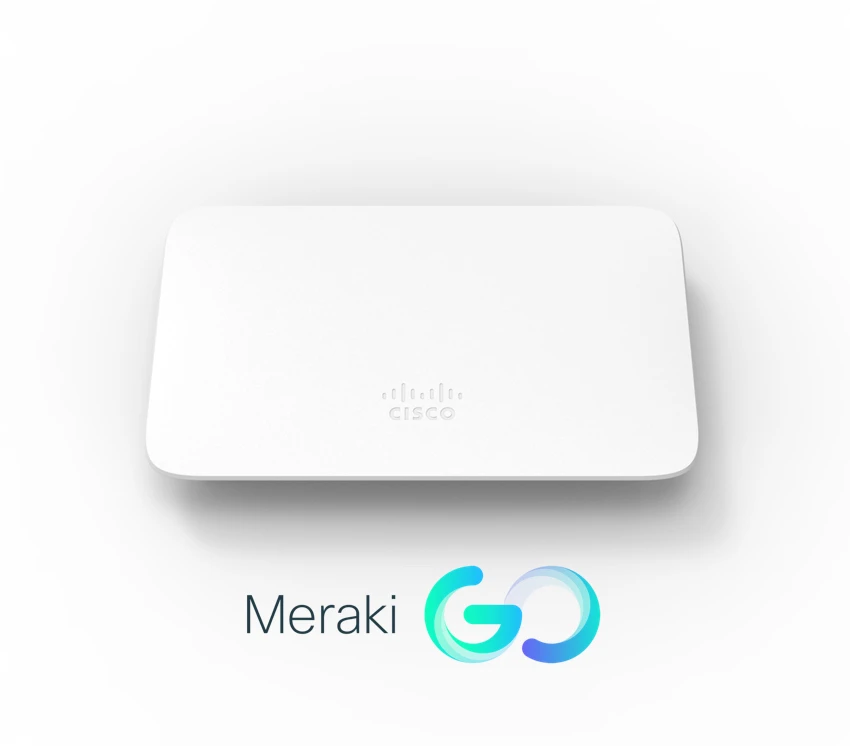
Cisco Meraki Go GR10
As I mentioned earlier, Cisco Meraki Go GR10 is an indoor access point which works in Dual Band (2.4GHz and 5GHz) and supports 802.11ac wave2 AC1200 protocol, which enables it to use the MU-MIMO 2x2 technology. Of course, it is equipped with a Gigabit Ethernet port and uses the PoE 802.3af standard and an alternative 12V power supply. Cisco Meraki Go GR10 has integrated omnidirectional antennas with 5.6dBi gain for 2.4GHz and 5.3dBi for 5GHz. It is worth to mention its PMK and OCK technologies which enable fast layer 2 roaming.
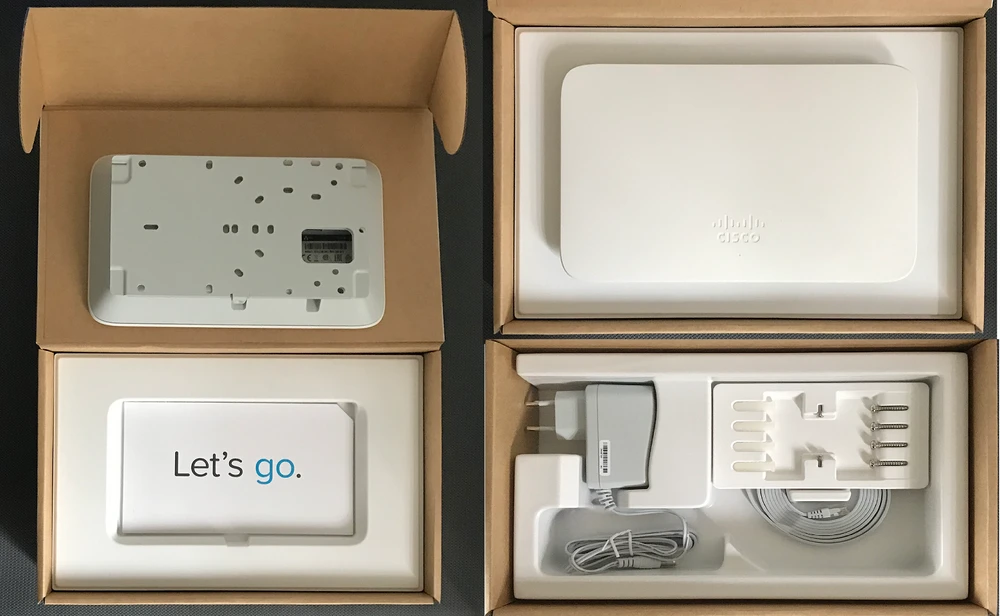
Cisco Meraki Go - configuration
Configuration via WWW
Configuration of the device and network is done via a smartphone application. We also have access to the configuration via WWW with a browser, where the web interface is very simplified. In short, the scope of the configuration via WWW has been simplified to a minimum and is limited to basic wireless data, Ethernet configuration and basic radio network parameters.
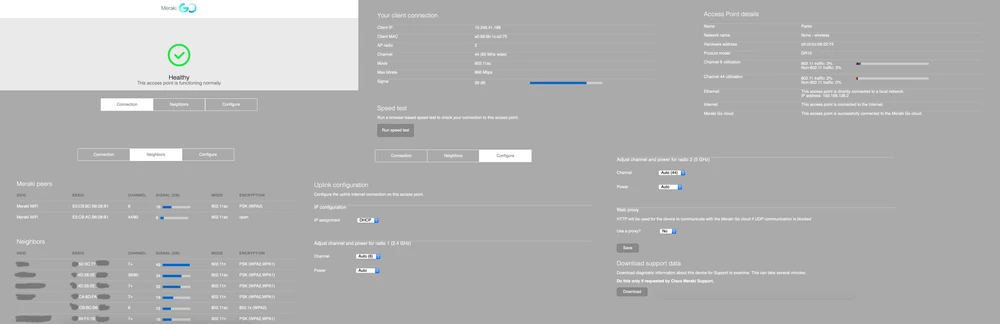
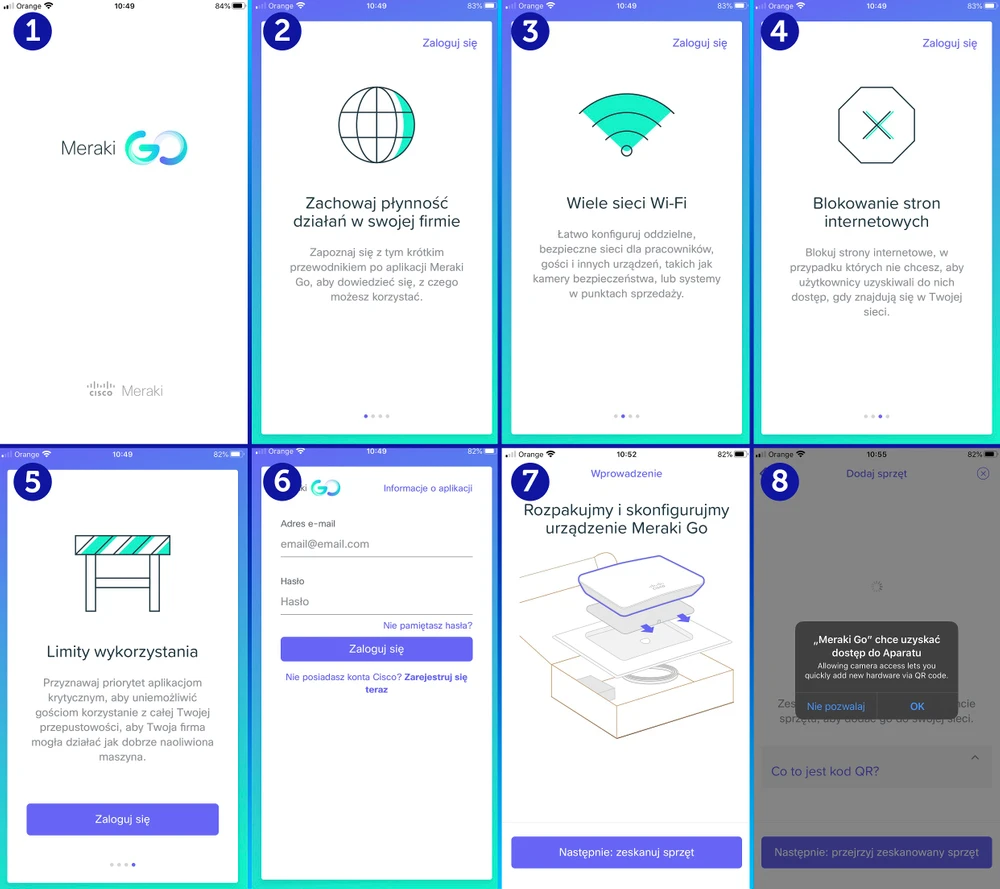
Mobile application - Cisco Meraki Go App
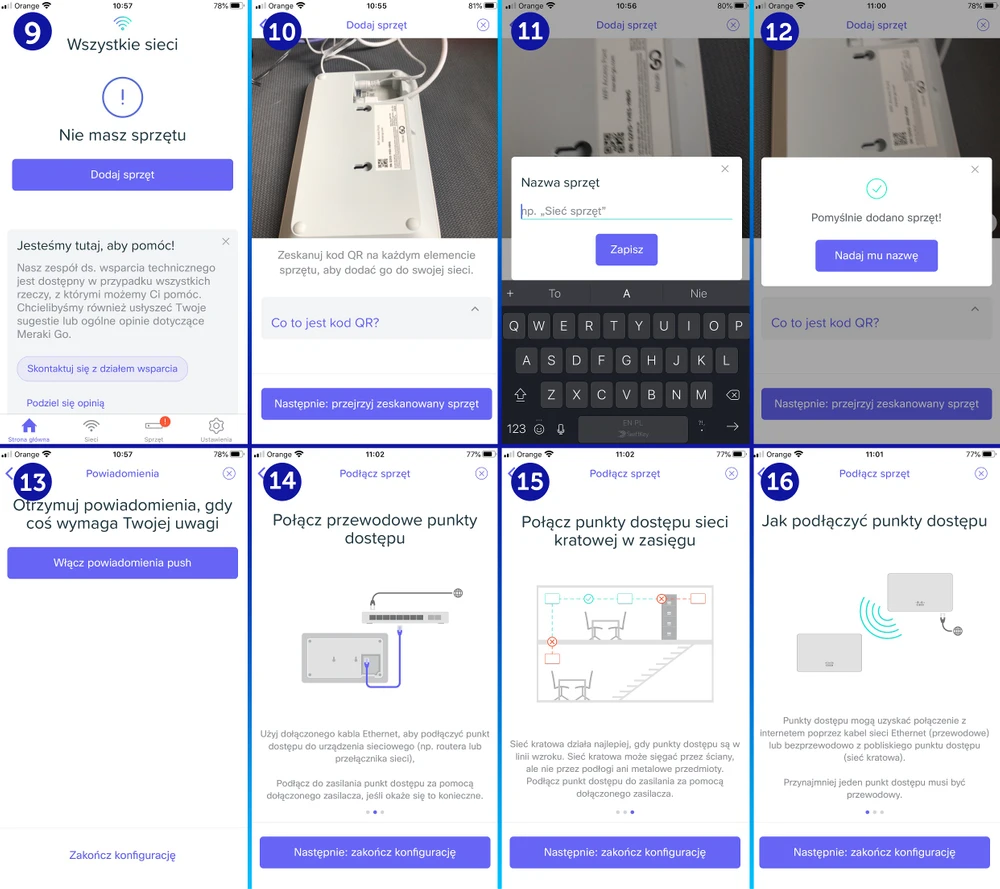
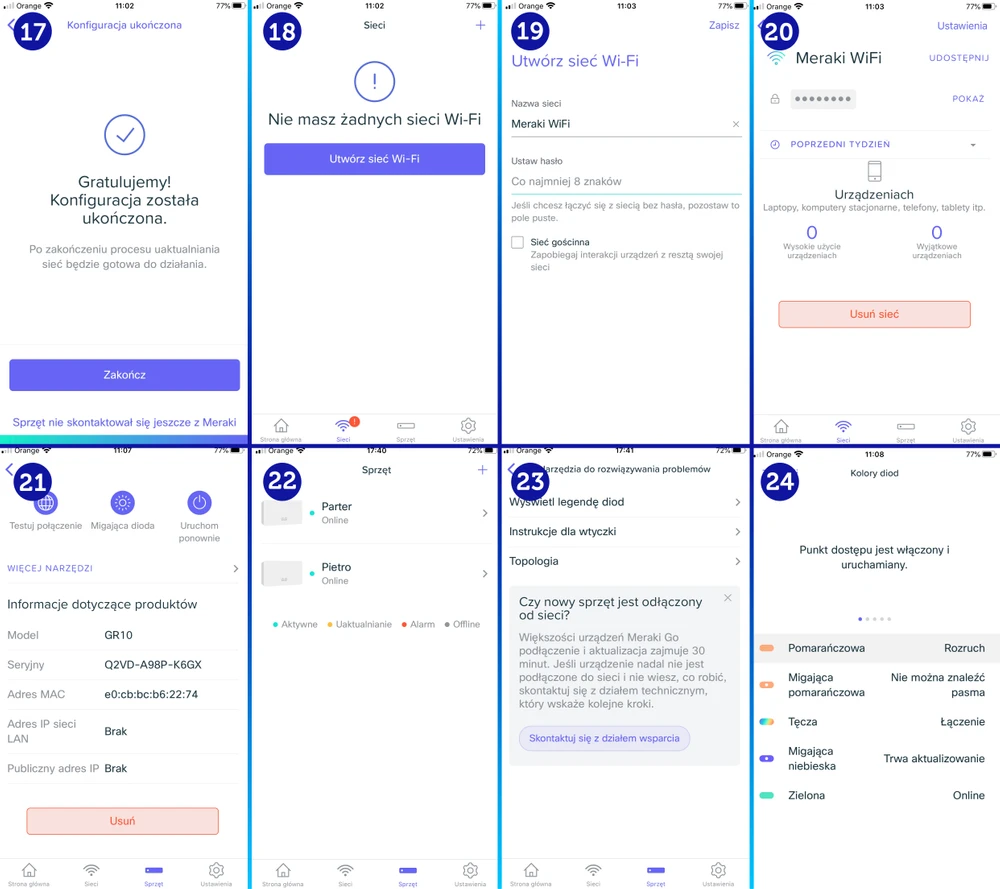
The Cisco Meraki Go App, which you can quickly download from the Play store, is worth mentioning. The configuration itself is very simple and intuitive. In fact, just about everyone should be able to use the app, even without any IT knowledge. The way the application is communicating and taking the user "by the hand" is exemplary.
Statistics and data in Cisco Meraki Go
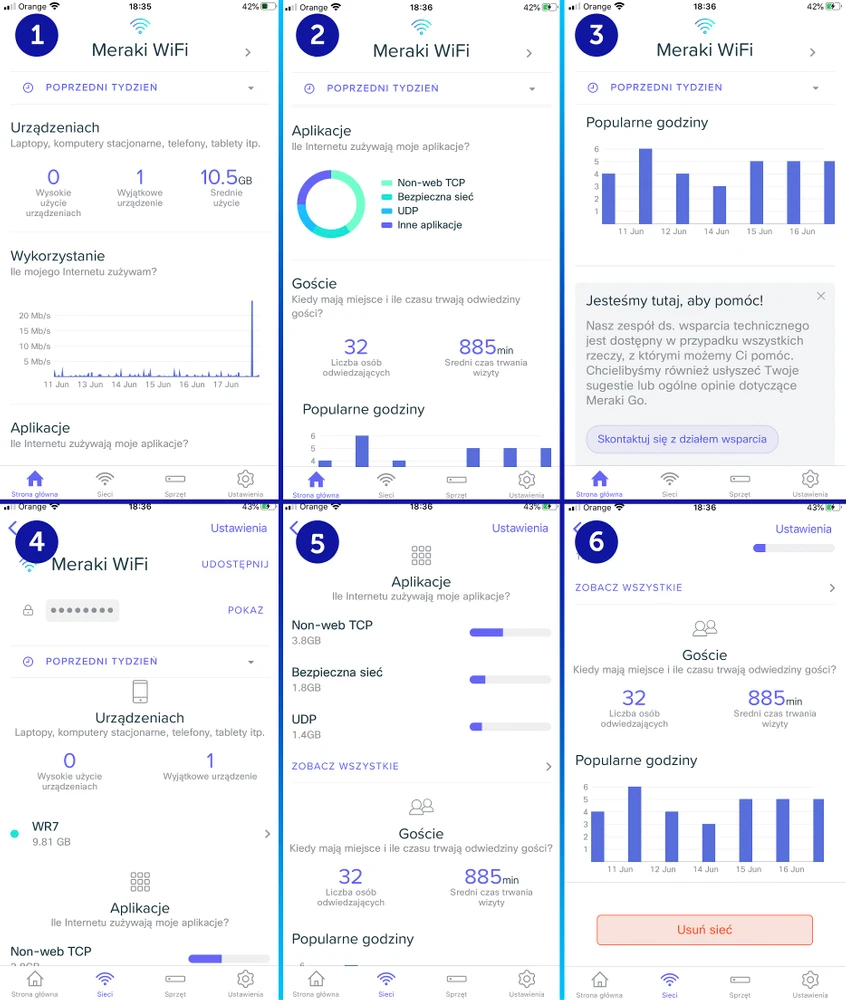
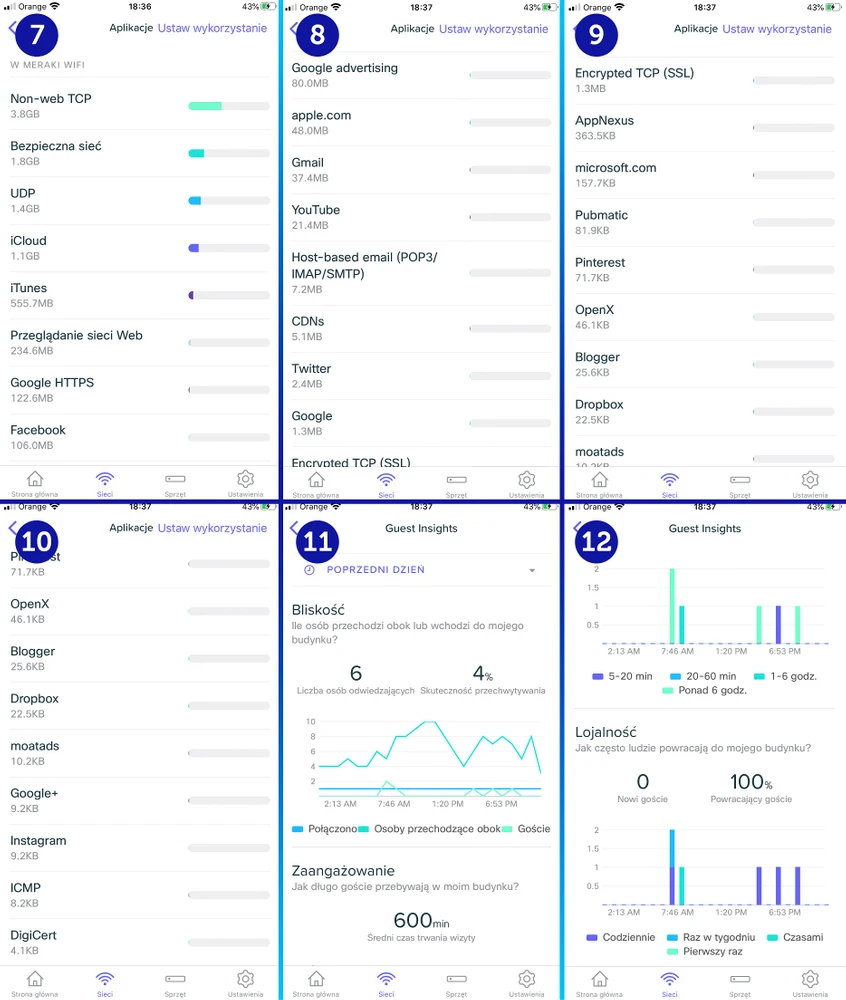
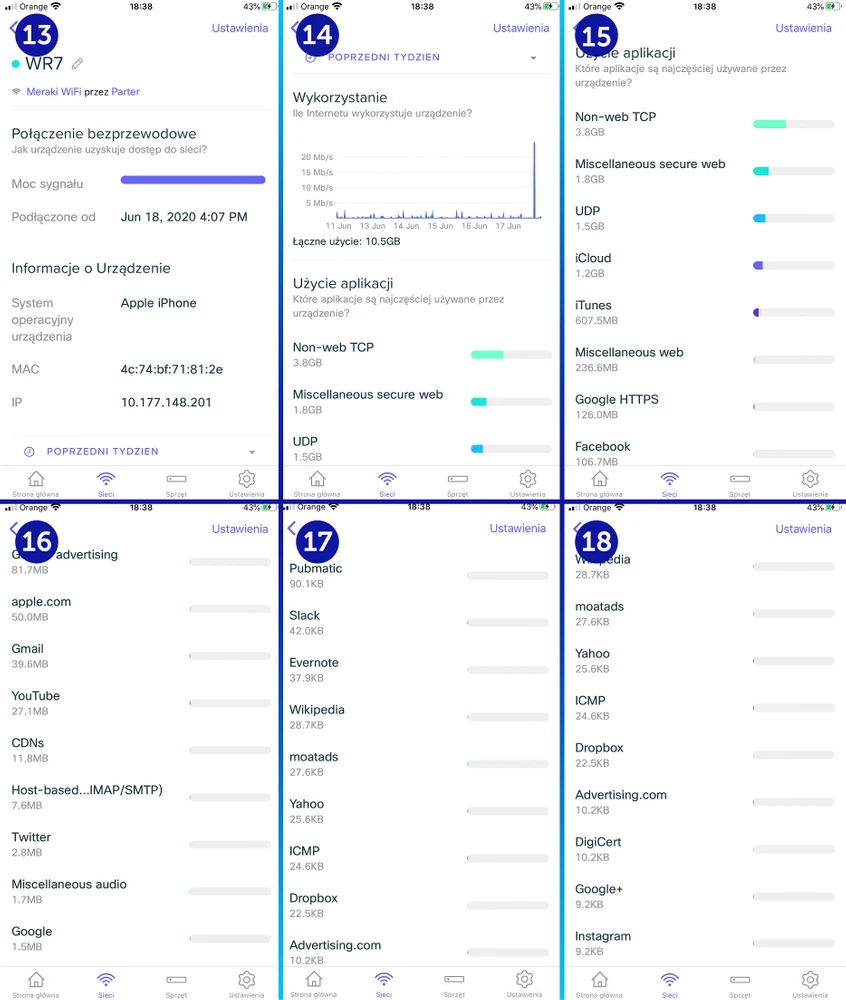
As you can see on the screens above, the first configuration of Cisco Meraki Go GR10 is actually trivially simple and can be handled by any ordinary user without any IT experience.At first glance, one could say that the application has a slight flaw and is basically devoid of any tools and data to perform network diagnostics. And we must sadly admit that it is indeed so! On the other hand, the amount of collected information about customer traffic in our network is very large... it can even be frightening with how detailed it is. We also obtained information that the collected data before sending to MerakiGo cloud are anonymized and limited only to pure service data.It can be clearly stated that with Meraki Go solutions, the manufacturer collects very detailed stats about the network and about individual client devices in its cloud. From the transmitted data we can find out what were the activities, where traffic was directed, which applications are used by users of our network and on what devices they work.
Operating characteristics of the Meraki Go GR10 transmitter
In all our tests, we measured the performance characteristics of individual transmitters with a spectrum analyzer. We did the same for Cisco Meraki Go GR10. The results are very thought-provoking... While working in 5Ghz band and 80MHz channel width, the transmitter has shown quite a lot of noise generation outside the broadcasting channel.
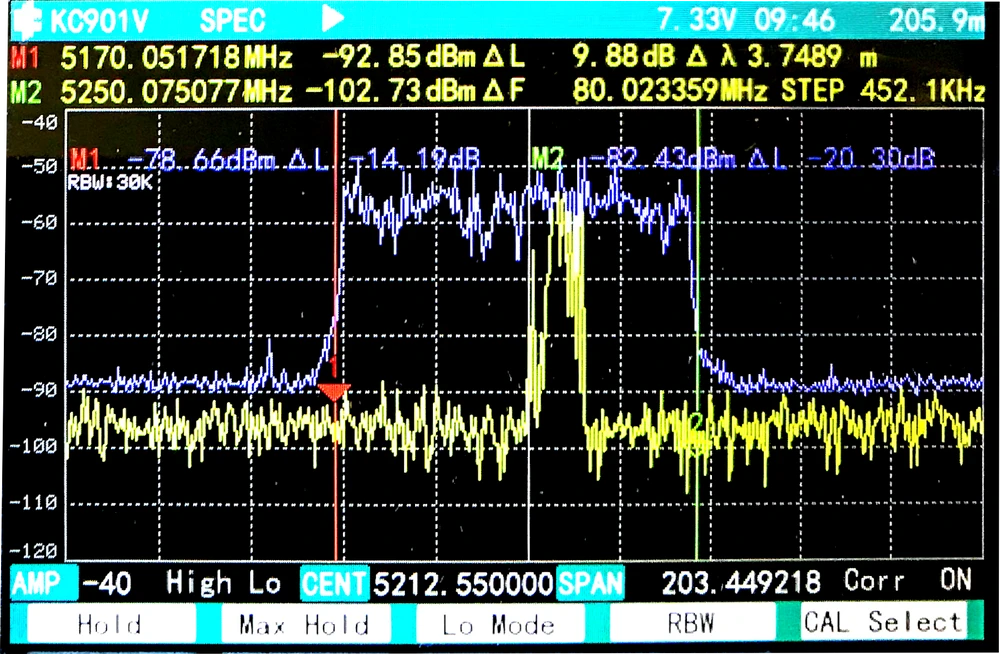
It wouldn't be so important if it weren't for the fact that the noise generated by Meraki Go GR10 is about -88dBm, and in momentary peaks even -84dBm, up to -86dBm! Therefore, such a situation may have a very negative impact on other wireless devices operating at close range.
Test environment
As before, the purpose of our tests is to check the wireless network coverage generated by the Cisco Meraki Go GR10. Of course, the devices work on a network based on MESH topology.While preparing the devices for testing we encountered a small problem: at the target location, the devices did not want to connect together and everything started working only after 1.5 hours, but we have to admit that it is very stable! Unfortunately, at the moment we have not managed to explain this problem.Back to the subject. This is another test of the series of wireless devices for home, office and industry. The test procedure is chosen in the same way as in previous tests. Thanks to this, all devices tested by us, are tested in the same conditions and similar configuration.
Network diagram
When testing Cisco Meraki Go GR10 we adopted a channel width of 80MHz for 5GHz connections and 40MHz for 2.4GHz band Of course, the testing device is also the same as in previous tests - MacBook Pro A1502, equipped with AirPort Extreme WiFi card (Broadcom BCM4360 3x3)
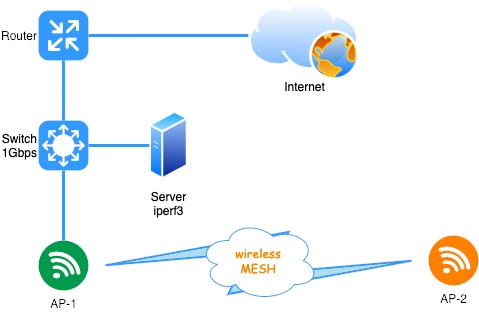
Before testing the wireless network, we checked the LAN performance for connections to the iperf3 server. The laptop was connected with a 10/100/1000Mbps network card to the switch. For a single TCP stream we obtained the following speeds:
Based on the above network diagram, it's hardly necessary to explain that Cisco Meraki Go GR10 Access Points have been connected to each other wirelessly (Mesh). - download 890Mbps
- download 950Mbps
AirSurvey signal map
Traditionally we present a Heatmap of obtained signals, which is necessary to visualize signal strenght on particular floors. Signal map was created using AirSurvey software.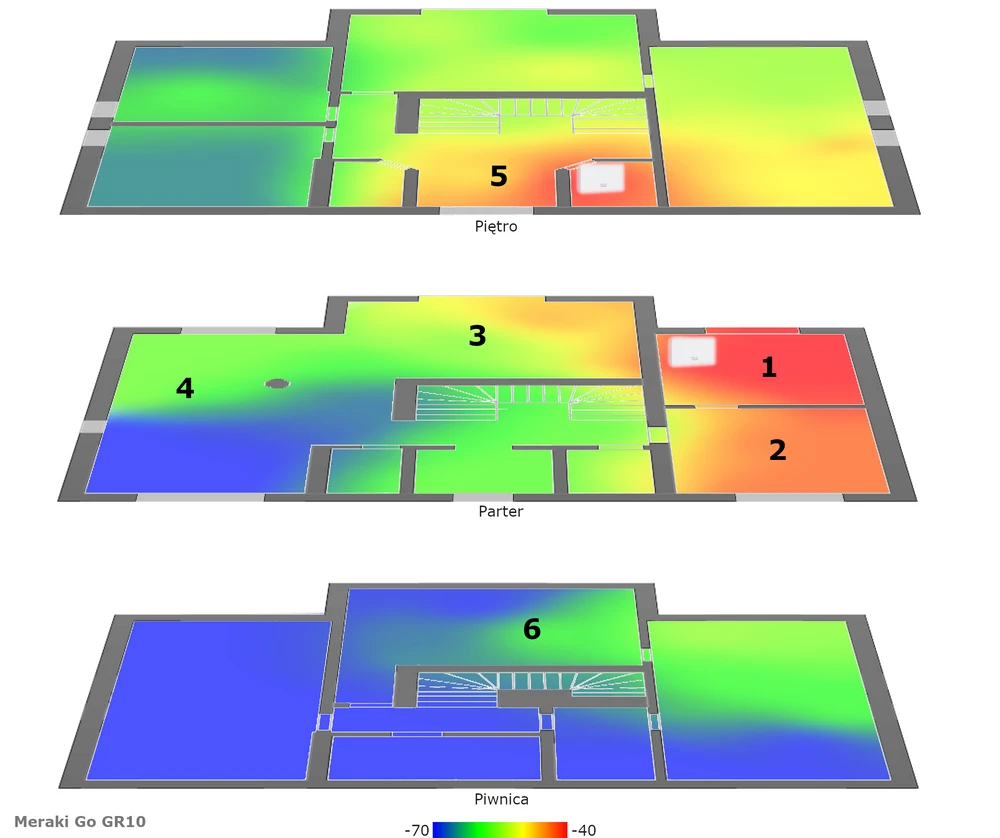
Cisco Meraki Go GR10 performance tests
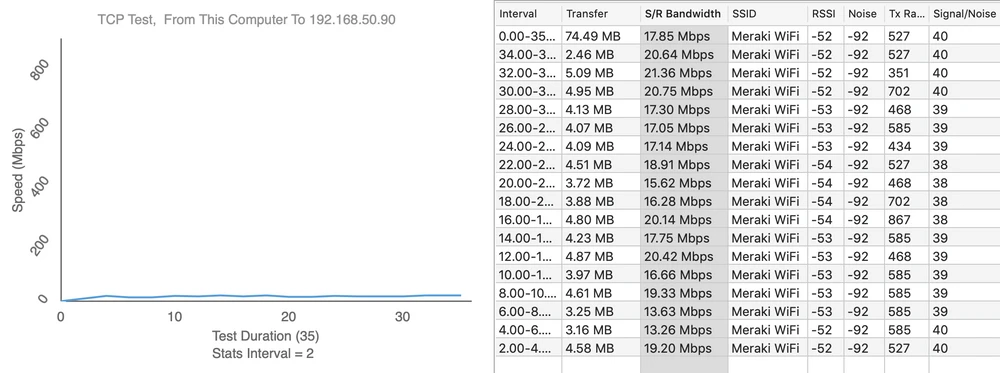
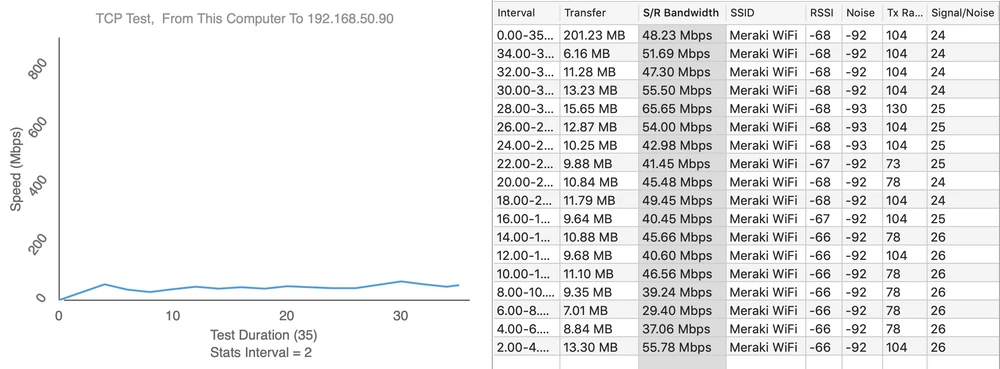
Performance tests Mesh network set up from two access points Cisco Meraki Go GR10, we performed similarly to the whole series of measurements from Part 1, Part 2, Part 3 and Part 4. Therefore, we are confident that our speed measurements will be as reliable as possible.Speed tests were performed with the WiFiPerf tool and the test server was running iperf3 software. With these tools we conducted a series of tests based on the TCP protocol, duration 60s. Below we present the results of Cisco Meraki Go GR10 speed tests against individual access points.
- measuring point No. 1
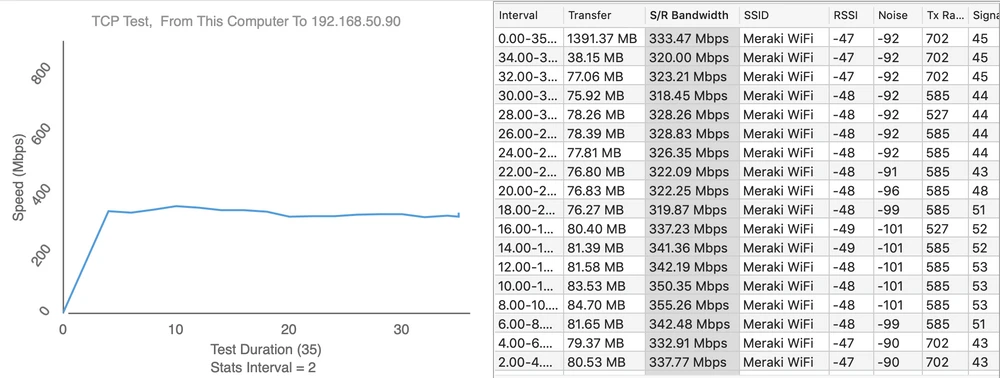
Upload 333Mbps
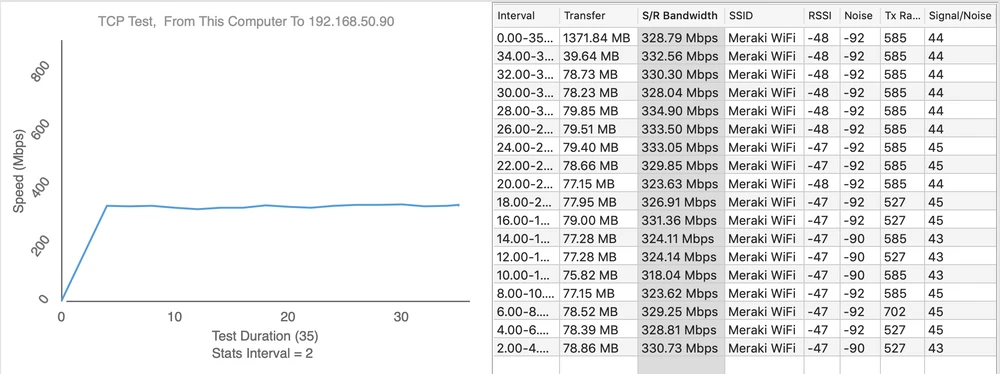
- measuring point No. 2
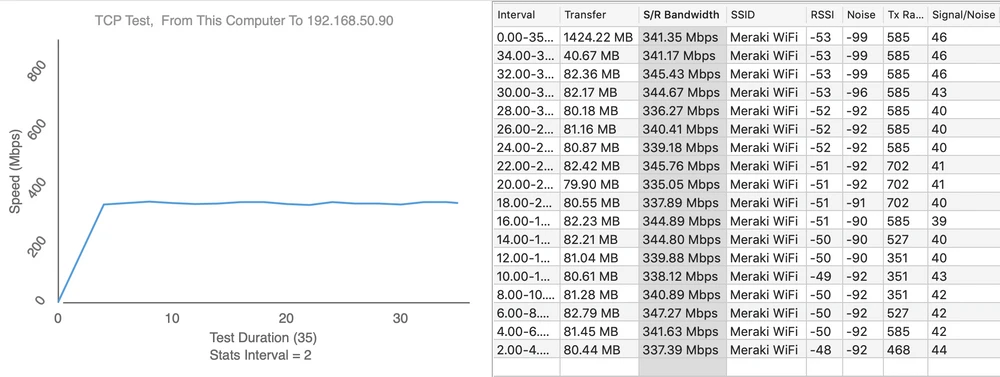
Upload 370Mbps
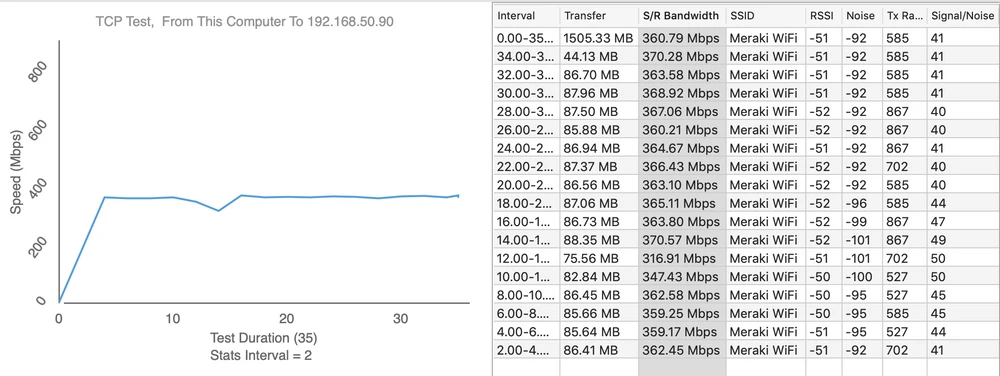
- measuring point No. 3
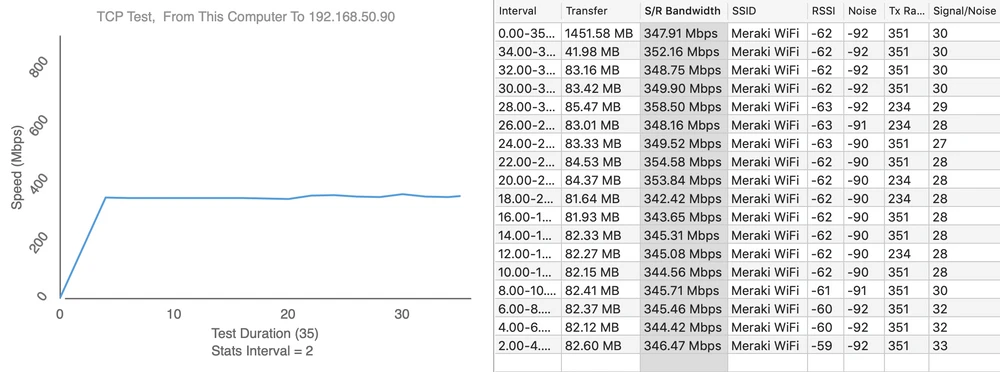
Upload 304Mbps
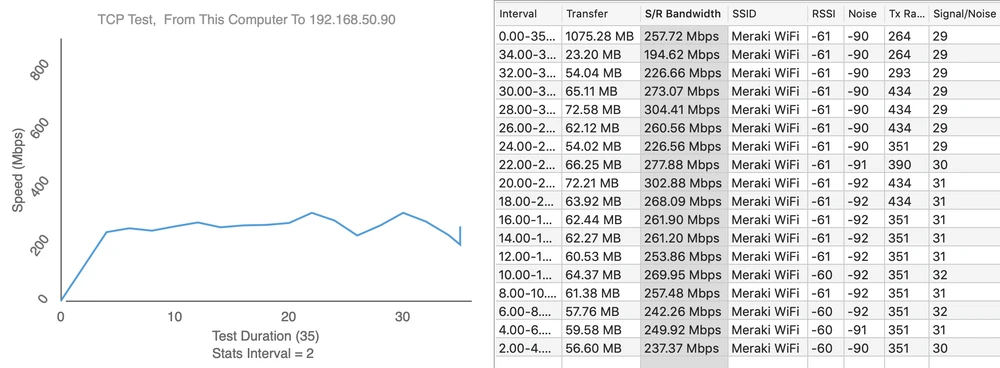
- measuring point No. 4
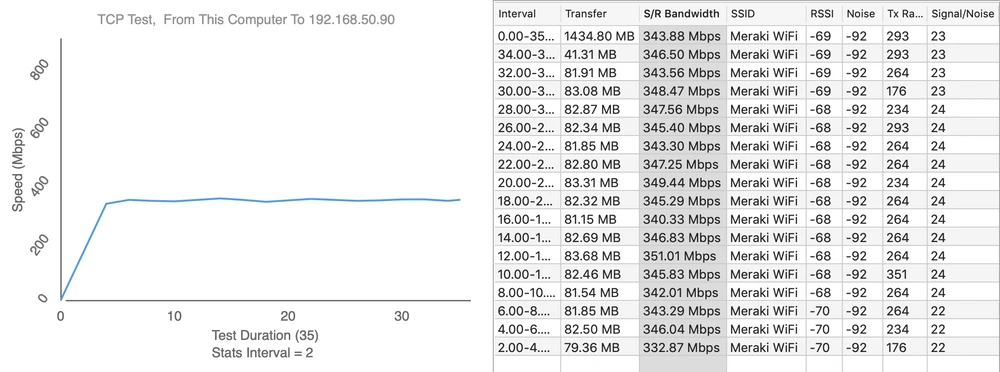
Upload 200Mbps
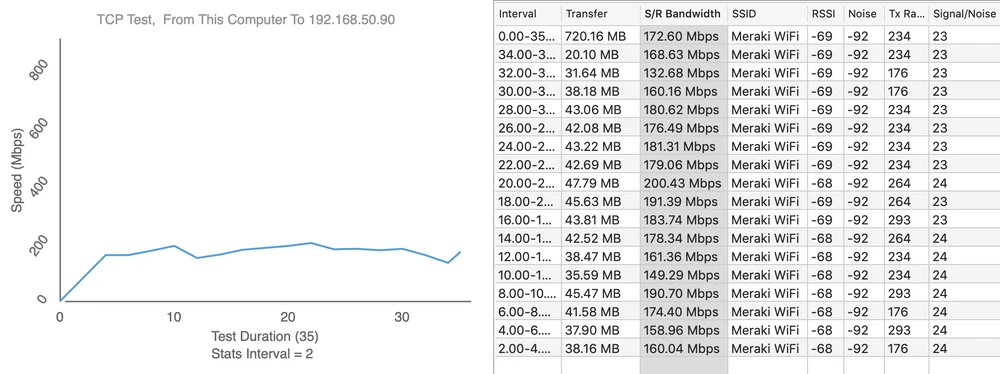
- measuring point No. 5
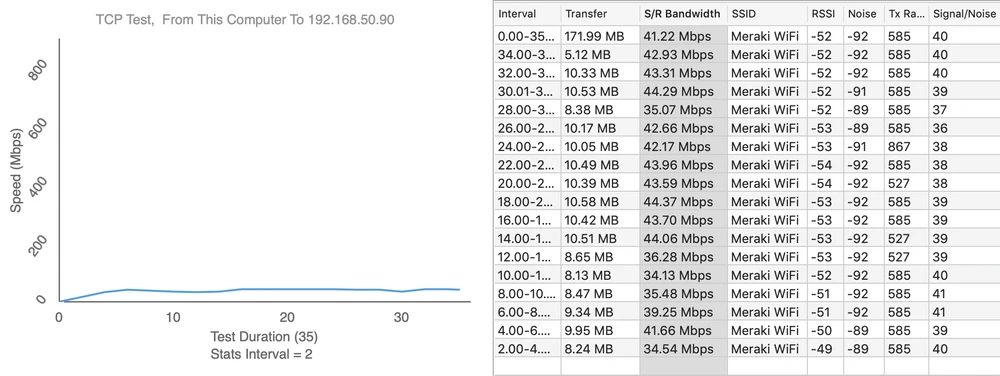
Upload 21Mbps
- measuring point No. 6
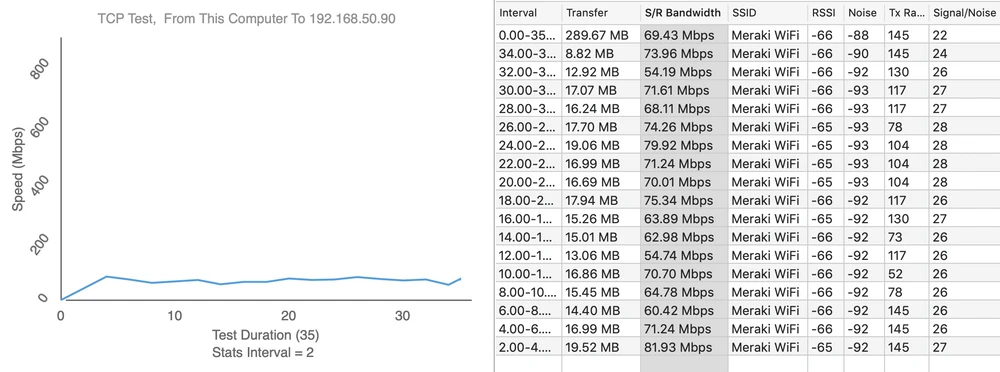
Upload 55Mbps
Summary and conclusions
You have to admit that the Cisco Meraki Go GR10 access point is a powerful device, both in terms of the bandwidth achieved in the Mesh topology and wireless coverage. The achieved bandwidth of over 350Mbps is enough to provide the user with very good conditions for using services such as Netflix, Skype or Youtube in 4k. Although at first we had "small problems" with the mesh topology, we have to admit that after the correct connection, the devices worked very efficiently. You could also have small objections to the noise generated outside the broadcasting channel, but there are many other Access Points from well-known manufacturers, which also behave similarly in the air.And there's the question of the diagnostic data being transmitted. As mentioned earlier, Cisco Meraki Go collects very detailed data of our wireless network. Of course, everything is also transmitted to Cisco cloud. But is it really something bad? After all, every administrator makes sure to collect as many logs, data and statistics as possible. This is necessary for later diagnosis of problems in our network. And given the class of solutions from Cisco and solutions like the Firewall Next Generation (NGFW), it can be considered that such diagnostic data are necessary.To sum up, one can admit that the Cisco Meraki Go GR10 series is a very interesting solution, designed not only for advanced users. This is a huge plus, because every user, even without any IT knowledge, can handle the configuration.
Of course, for further discussion we invite you to our FORUM, where you can exchange your experiences with Cisco products. Authors: Wojciech Repiński Leszek Błaszczyk
Loading...