



Totolink N200RE-V5 - Performance test and overview

Totolink N200RE-V5 specification
Router Totolink N200RE-V5 has a minimalist design, so the device will certainly find a place in every corner of the house. The router itself is compliant with the IEEE 802.11n standard operating on the 2.4GHz band, additionally the manufacturer has used two built-in 5dBi antennas providing wireless data transmission up to 300Mbps. It is also worth mentioning the installation of the router itself, thanks to IOS and Andriod's "Totolink Router" application the device is extremely easy to set up - after just a few steps, Totolink N200RE-V5 is ready to connect to the Internet immediately. The N200RE-V5 supports IPTV, making it ideal for home use. Moreover, the device can work in 3 other modes outside the router.
- Bridge mode, operation as a typical accesspoint
The device becomes a wireless access point for other devices.
- WISP mode, wireless connection as WAN
Extend the wireless coverage of the main modem to anywhere in the house.
- Operation in wireless repeater mode

Construction of Totolink N200RE-V5
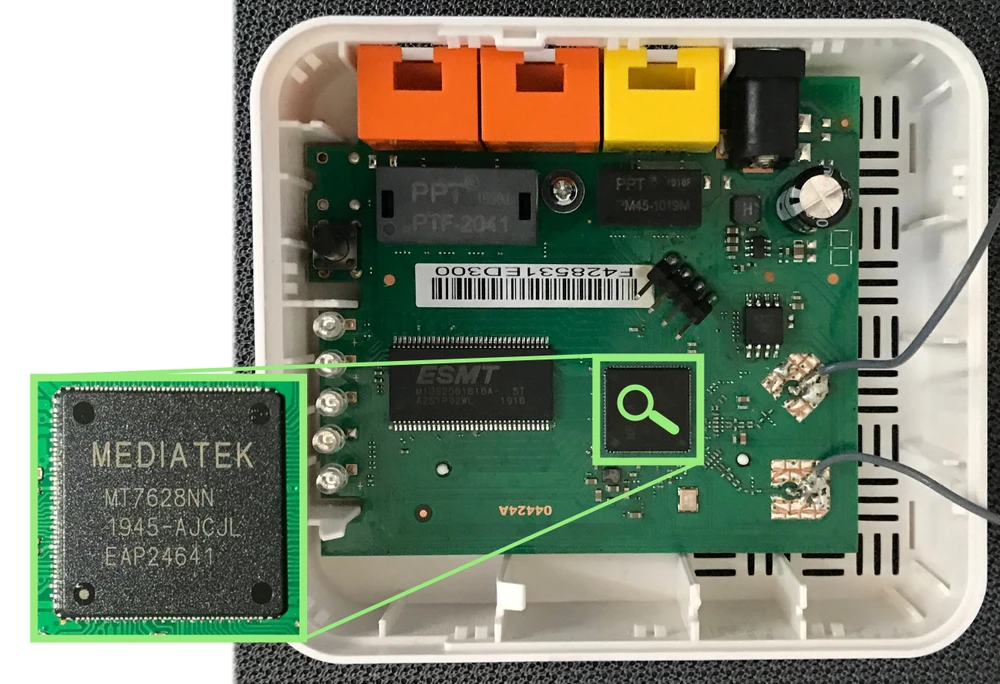
The device is built on the Mediatek MT7628NN, 580MHz MIPS 24KEc processor, which has a built-in 3-port switch and a wireless network module 2.4GHz 2T2R 802.11n, which operates at a wireless speed of PHY 300Mbps - unfortunately we can't exactly verify this because of the Ethernet limitation on LAN/WAN ports to 100Mbps. Despite this limitation, it should not affect daily network usage in most houses/apartments.
Performance measurement
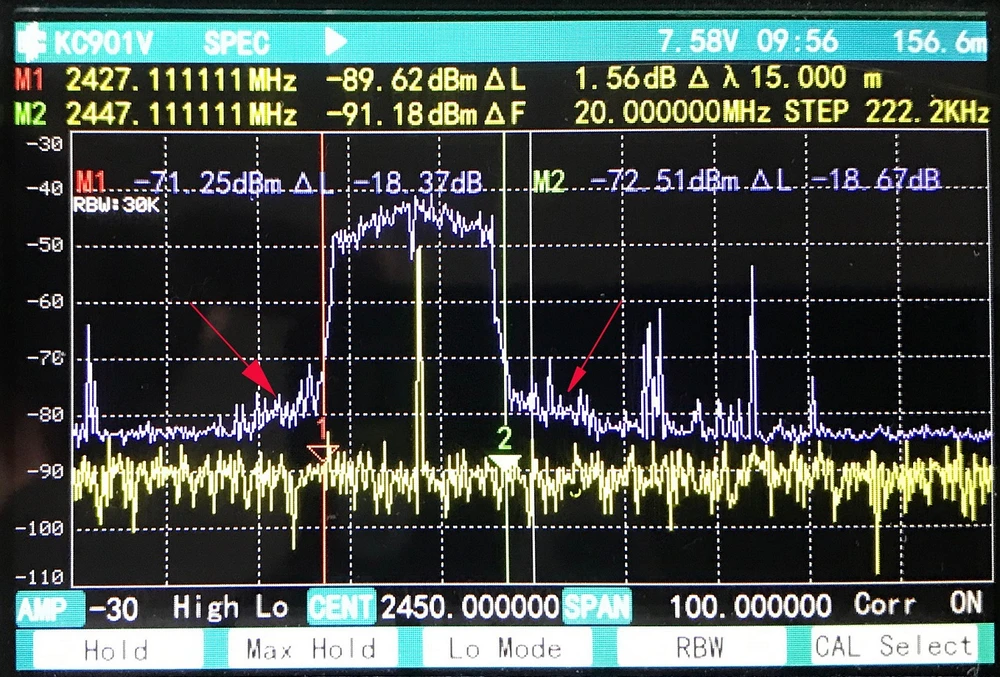
The device has been tested on a meter for wireless devices. Despite the settings and forcing it to work in the 40MHz (20+20MHz) band, the router worked stubbornly with its 20MHz width, which strangely did not affect the reduction of available speeds. Totolink N200RE-V5 has been tested in an active environment with other available 2.4GHz WiFi networks and Bluetooth devices.
Performance test of Totolink N200RE-V5
The purpose of our tests is to verify the range of the wireless network and to test the real speed available in the building. Before performing speed tests we verified the maximum performance of the LAN and iperf3 server. The testing device was MacBook Pro A1502, which is equipped with a built-in AirPort Extreme wireless card (Broadcom BCM4360 3x3, 1.3 Gbps PHY) working under 802.11a/b/g/n/ac standards.
Maximum speeds for a single TCP:
- Download: 894Mbps
- Upload: 958Mbps
Signal map
The AirSurvey software was used to perform heat-map (signal map). Access point location has been marked with an appropriate icon, to read the signal levels correctly pay attention to the color legend at the bottom of the picture.
Totolink speed test N200RE-V5
- measuring point No. 1


- measuring point No. 2


- measuring point No. 3


- measuring point No. 4


- measuring point No. 5


- measuring point No. 6


Summary
Totolink N200RE-V5 is definitely designed for people who are looking for an easy and seamless wireless network for their home. The device complies with the IEEE 802.11n standard and operates in 2.4GHz at a transfer rate of 300Mbs - these parameters are sufficient to meet the typical needs of home network users. The manufacturer has made sure that the operation and configuration runs smoothly and quickly - and that's it, you just need to install the Totolink application on your phone, then just follow the intuitive installation. Another thing telling us that Totolink N200RE-V5 is designed for home use is the IPTV standard that allows you to enjoy multimedia entertainment via broadband Internet. In addition, the router allows us to create a separate network, called a "guest network", and also gives us parental control that helps block access to key words with bad, unhealthy content for our children. The disadvantages include the limitation of LAN Ethernet ports to 100Mbps, where the wireless network has full use of up to 300Mbps - this is far too little for a LAN port, also the lack of full VLAN support should be mentioned.
Available standards and functions:
- Parental control functions
- Guest user feature
- Built-in firewall, band management and URL filtering
- Possibility to add static routing
- The DMZ service
- VPN passthrough service
- Port forwarding service
- Support for IPTV, IGMP V2, support for IGMP Proxy, IGMP Snooping with transmission to vlan.
Wojciech Repiński
Dawid Niezgoda