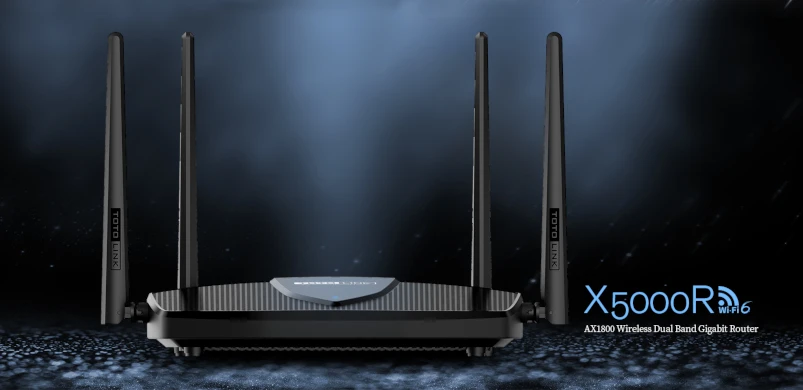
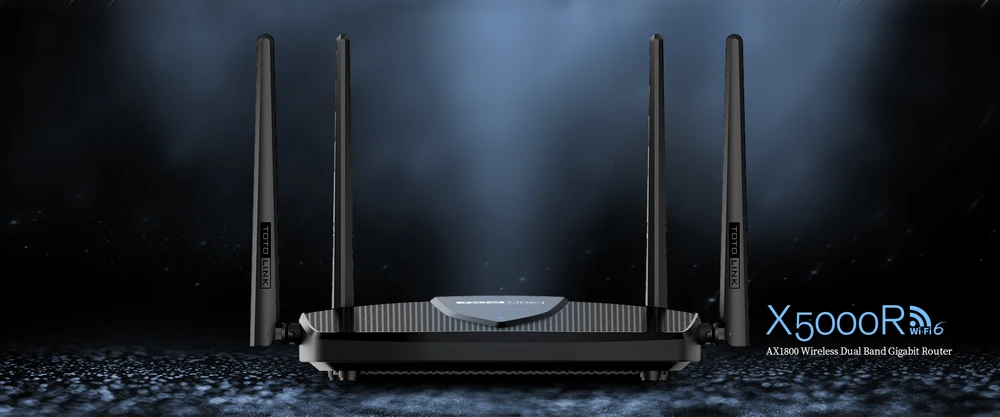
Totolink is a well-known manufacturer of high-quality networking equipment and is trusted by many users around the world. The company has recently released a new 6th generation Wi-Fi router in Europe with many impressive features. The
X5000R router is supported by the latest
Wi-Fi 6 standard,
IEEE 802.11ax, which is even faster, more energy-efficient, more secure and more stable than the previous Wi-FI 5 standard. The device operates on two frequencies, 2.4GHz and 5GHz, which together provide data transfer speeds of up to
1774 MB/s. It should be emphasized that this result is up to 4x faster than the previous 11ac technology. Another thing that catches the eye is the powerful dual-core processor clocked at 880MHz which, according to the manufacturer, provides reliable performance for real-time applications. Additionally, the new Totolink X5000R router is equipped with Wi-FI 6 related technological innovations, which ones? Let's find out!
Totolink X5000R Specifications
Totolink X5000R is a multifunctional and powerful AC1800 class wireless router, which is compliant with the latest generation of Wi-FI 6 standard (IEEE 802.11ax). The device working simultaneously on two frequency bands 2.4GHz (573Mbps) and 5GHz (1201Mbps) provides a total data transfer speed up to 1774 MB/s. The DualBand standard guarantees access to two separate Wi-FI networks, where the 2.4GHz frequency is responsible for high compatibility, and the 5GHz band significantly reduces interference. According to the manufacturer's promises, the built-in dual-core processor Dyualcore Mediatek MT7621A with a clock rate of 880MHz ensures stable operation of the device even under the heaviest load. Totolink X5000R router is equipped with a number of new advanced technologies such as OFDMA, MU-MIMO 8x8:8, Beamforming and Easy Mesh support. All these are part of the new Wi-FI 6, we will briefly try to explain each technology below.
How does OFDMA work?
OFDMA (Orthogonal Frequency Division Multiple Access) is actually an extension of the existing OFDM (Orthogonal Frequency Division Multiplexing) architecture. The OFDMA standard is designed to take the sent WI-FI channel and divide it into smaller frequency sub-channels, known as Resource Units (RU). For example, a traditional 20Mhz channel can be divided into many smaller channels so that simultaneous data transmissions can occur for multiple users. OFDMA technology has long been used in special communication systems such as the military. The implementation of OFDMA for the public sphere was only a matter of time.
WIFI 5 OFDMWiFi 6 OFDMAMU-MIMO on Wi-FI 6
The new WI-Fi 6 standard also supports auxiliary multi-user technology. Called multiple input and multiple output (MU-MIMO). Like OFDMA, the MU-MIMO standard allows communication between users and an access point (AP) for multiple clients during the same transmission. However, instead of sharing the frequency space as OFDMA does, MU-MIMO takes advantage of the fact that access points (e.g., routers) have multiple transmitters and receivers that are used for parallel transmission. This allows an access point with MU-MIMO to send unique modulated data streams to multiple clients simultaneously.
A significant difference between MU-MIMO in WI-FI 5 (802.11ac) and Wi-FI 6 (802.11ax) is how many MU-MIMO clients the access point can communicate with in real time. Wi-FI 5 is limited to a group of only four clients. The new Wi-FI 6 is designed to support 8x8:8 MU-MIMO in both the downstream link and the upstream link, allowing up to eight simultaneous users.
Beamforming
Another technology that has been improved with Wi-FI 6 is Beamforming. This method of data transmission is actually very simple. Traditional routers when they broadcast a WI-FI signal send data in all directions, with beamforming the router determines where your device (laptop, smartphone or whatever) is and sends a stronger signal in that direction.
WPA3
WPA (WI-FI Proteced Access) is a commonly used security protocol for WI-FI networks where passwords are used for encryption. Wi-FI 6 uses WPA3 this is the latest updated implementation of WPA2 which has been in use since 2004. WPA3 provides new features for personal and corporate use such as 256-bit Galois / Counter mode protocol (GCMP-256), 384-bit hashed Message authentication mode ( HMAC ) and 256-bit Broadcast / Multicast Integrity Protocol (BIP-GMAC -256). All of this guarantees more secure password encryption and increased protection against network attacks, providing even more stable surveillance of your home Wi-Fi network.
Comparison of Wi-FI 5 and Wi-FI 6
| Protocol | 802.11ac Wave 2 | 802.11ax |
| Frequency (GHZ) | 5 | 2,4 / 5 |
| Channel width (MHZ) | 20/40/80/80-80/160 | 20/40/80/80-80/160 |
| MIMO | MU-MIMO (downlink) | MU-MIMO (downlink, uplink) |
| Transmission Technology | OFDM | OFDMA |
| Modulation | 256-QAM³ | 1024-QAM |
| Number of streams | 8 | 8 |
Available speeds | up to 6.9 GB/s | Up to 9.6 GB/s | | Other | Beamforming | Beamforming |
Construction of Totolink X5000R
With the technical specifications behind us, we can move on to a brief description of the build of the X5000R. The device comes in a white box, where inside you'll find the eponymous accessory, a brief user manual, an RJ45 network cable, and a 12V/1A power adapter.
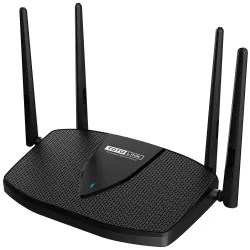
When it comes to the router's design, it doesn't differ much from its predecessors in the Wi-Fi 5 standard. In the upper part of Totolink's casing, we'll find an LED that indicates the operation status. In addition, we can also find a wide radiator system that is evenly distributed on the top and bottom of the device. The manufacturer has equipped the router with 4 external 5dBi antennas, which, according to the specifications, should ensure coverage of the area up to 200-250 m2. The rear of the device consists of 5 ports, of which there are 4 LAN ports and 1 WAN port with speeds of 1Gbps, next to a fairly standard we find the power socket and reset button.

Configuration
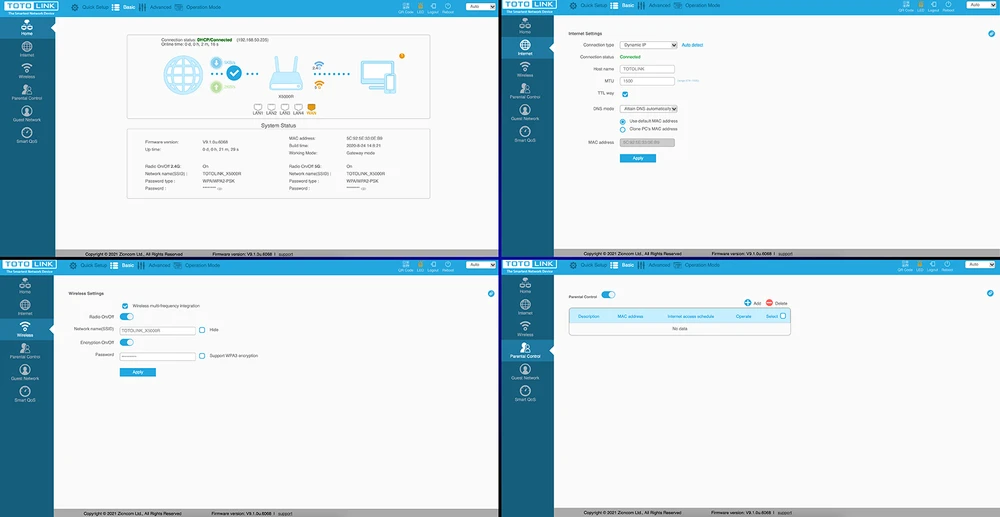
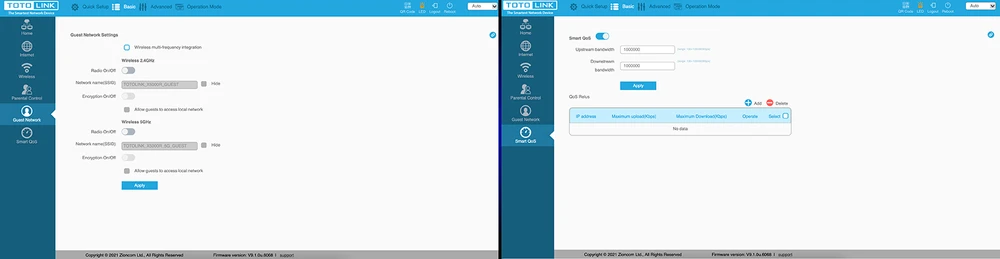
Configuration of Totolink X5000R is quick and intuitive. To log in to the router, enter the address 192.168.0.1 in the browser.
Then enter the password and login: admin
NOTE: The device does not detect new firmware, which is available at:
https://www.totolink.net/home/menu/detail/menu_listtpl/download/id/218/ids/36.htmlWe recommend that you update the firmware, failure to do so may result in problems with connectivity from Windows 10.
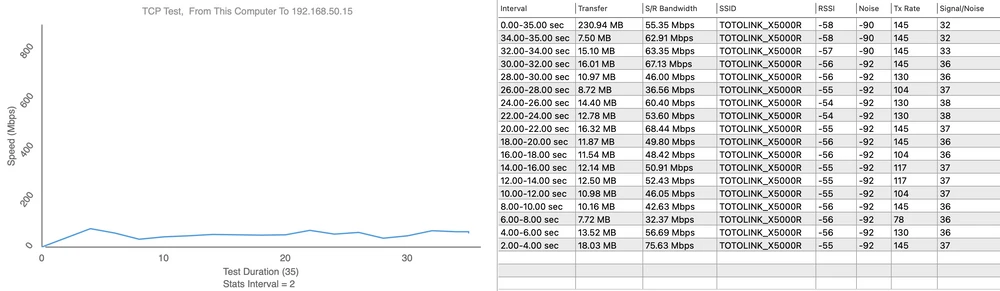
Totolink X5000R Performance Test
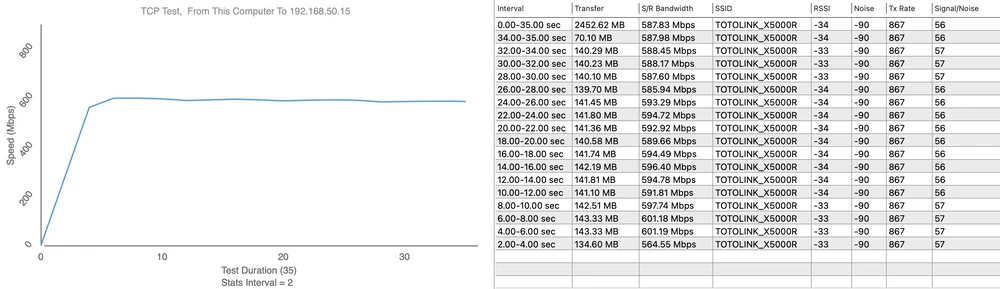
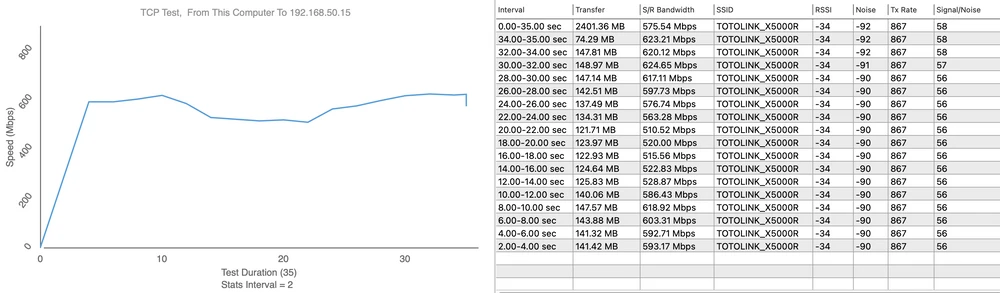
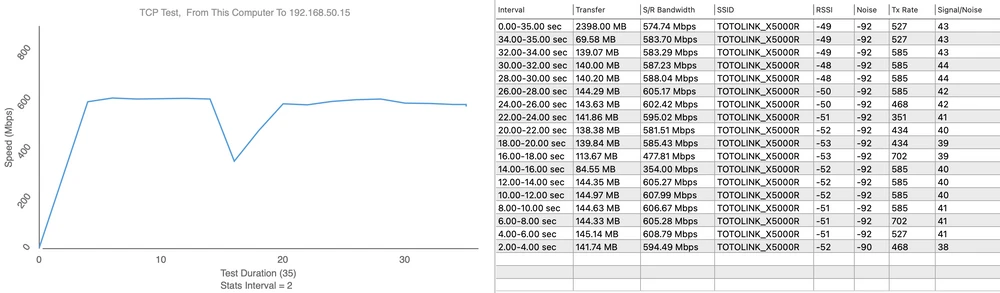
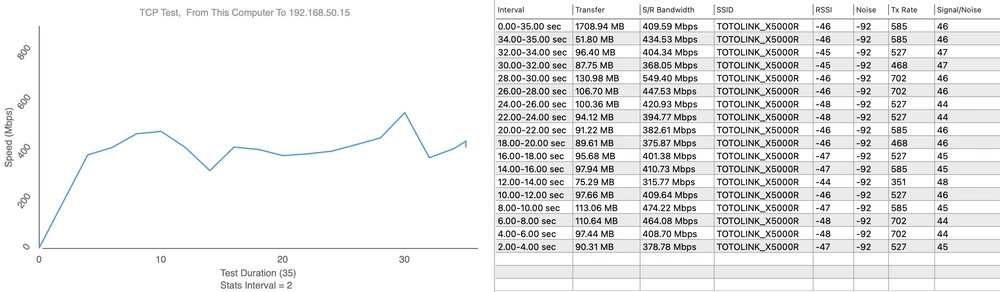
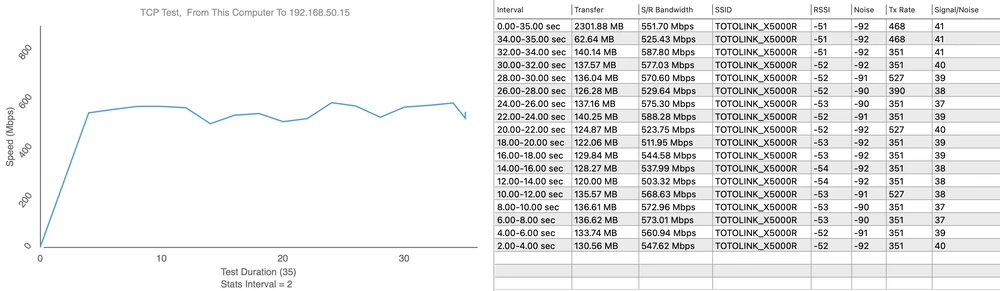
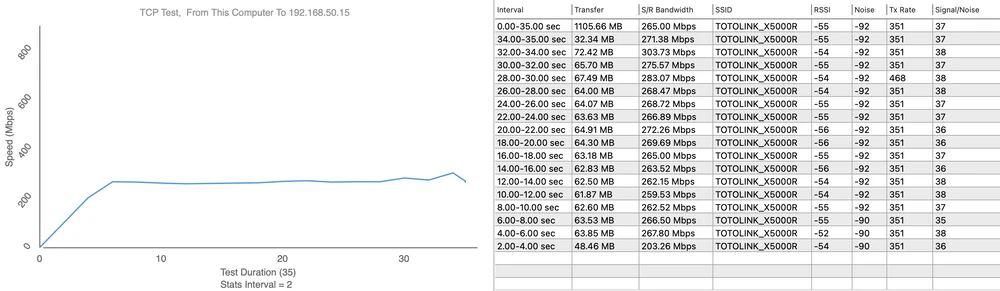
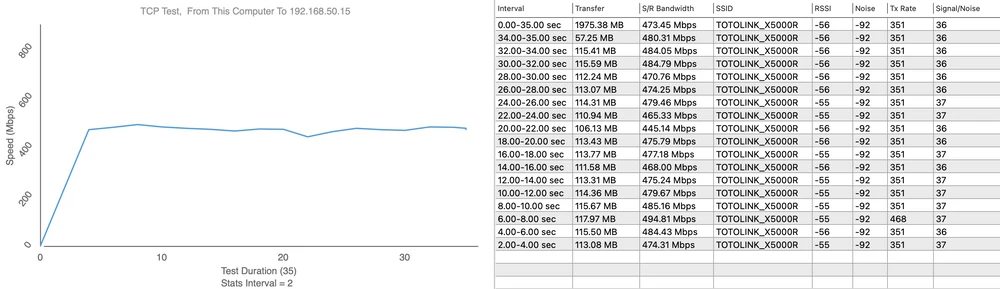
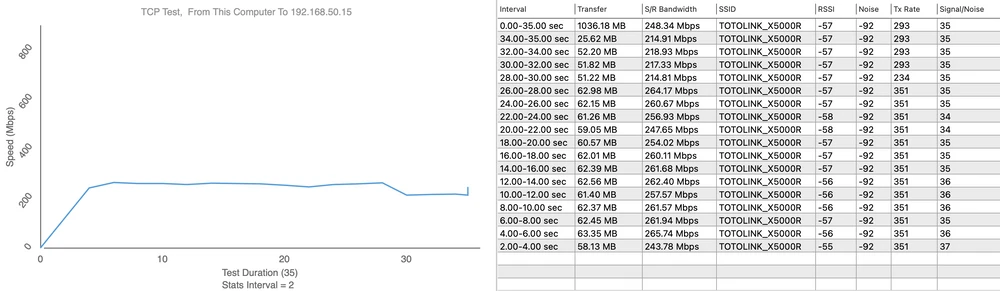
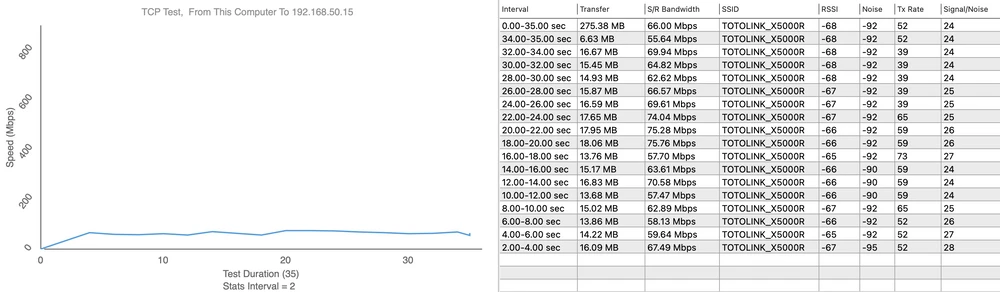
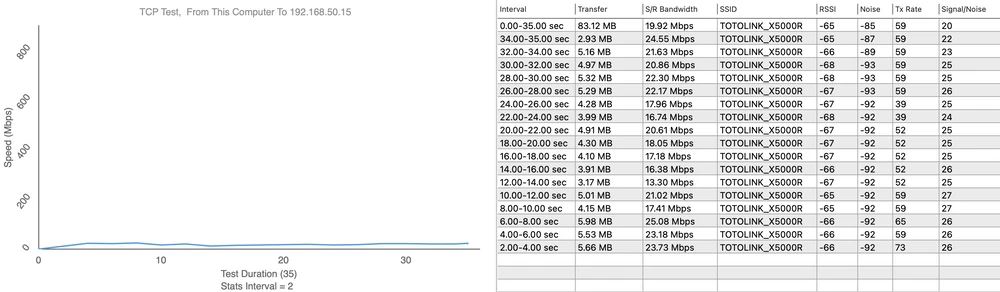
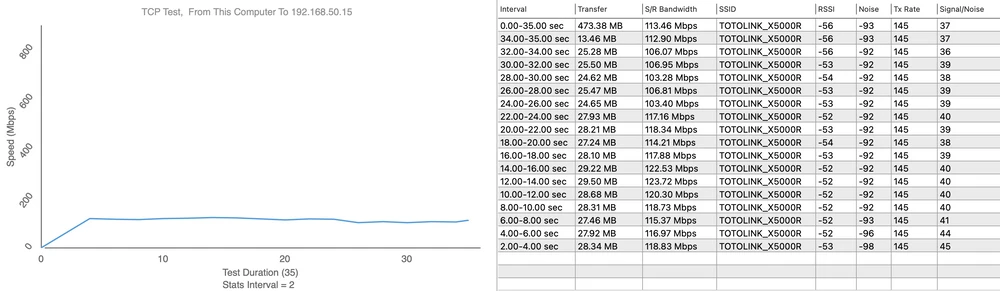
The aim of our tests is to verify the range of wireless network both in terms of signal coverage and real speeds available in the building. For 2.4GHz connections we assumed the maximum channel width of 20MHz. The testing device was MacBook Pro A1502 equipped with built-in wireless card AirPort Extreme (Broadcom BCM4360 3x3, 1.3 Gbps PHY) working in 802.11a/b/g/n/ac standards.
Signal analyzer
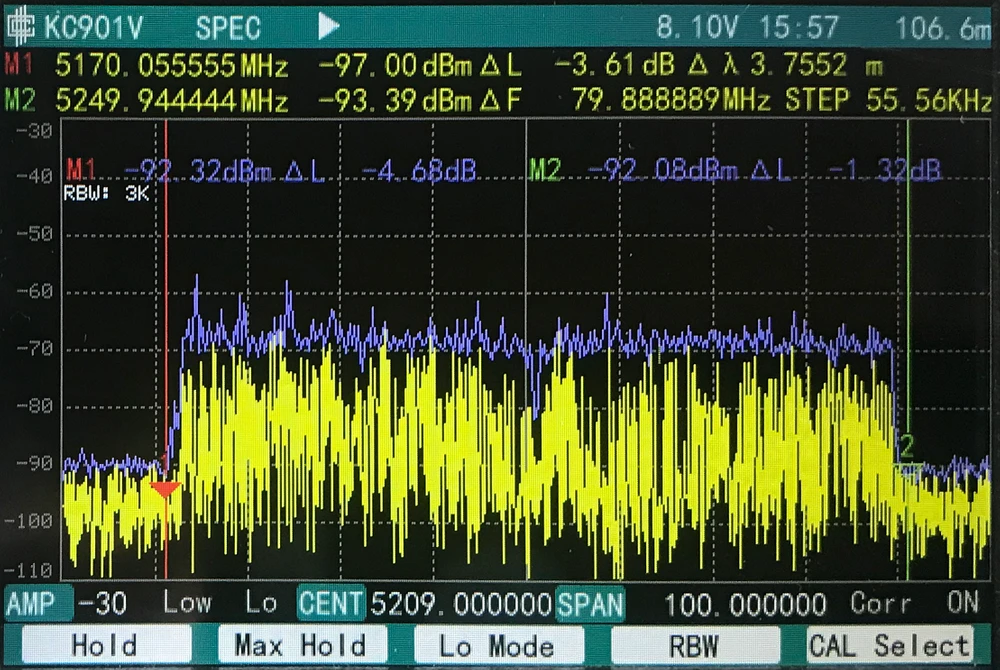
The device transmits the signal very evenly, as you can see on the diagram the transmitting power is not overdriven. On both sides of the edges of the channel there are large margins ensuring interference-free work in environments with many transmitters. The router generates practically no noise on adjacent channels. The characteristics can be considered exemplary.
Signal map
We used AirSurvey software to make a signal map. To correctly read the signal levels pay attention to the color legend at the bottom of the picture. The location of the access points is marked with an icon.Speed test X5000R
Download
601MbpsUpload 256Mbps
Upload 549Mbps
Measurement point No. 3 Download 588MbpsUpload 303Mbps
Measurement point No. 4 Download 494MbpsUpload 256Mbps
Upload 25Mbps
Upload 75Mbps
Summary
The appearance of new routers with WI-Fi 6 support on the market can be welcomed with a smile on the face, and today's test of the Totolik X5000R is a great confirmation of that. The manufacturer has entered the European market with a very good product that attracts with its high level of performance. You should pay attention to the well-thought-out software, great throughput as well as the well-tuned system of automatic connection between the 2.4GHz and 5GHz networks. The updated mobile application cannot be ignored either. Of course, Totolink X5000R is not a perfect device, the biggest disadvantage is undoubtedly the lack of a USB port to expand the functionality.
At the end of the day, buying a Totolink X5000R router, you not only get a high quality device, but you also make a good investment for at least a few years.