TP-Link Deco X60 - High-bandwidth Wi-Fi Mesh System

TP-Link Deco X60 - High-bandwidth Wi-Fi Mesh System
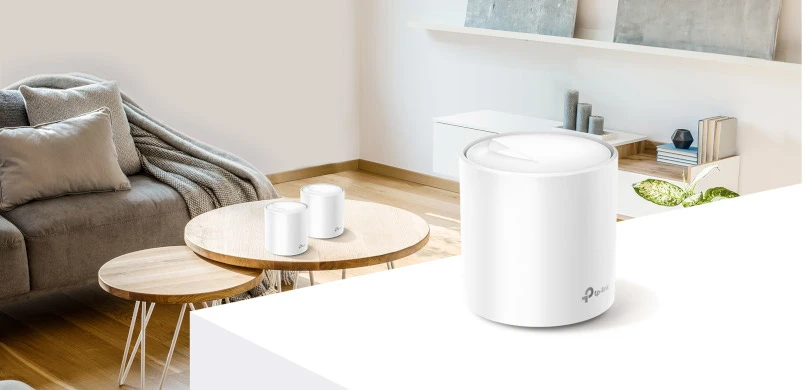
After the Deco M4 product line, TP-Link has developed a new generation of Mesh Deco X devices with support for the latest 802.11ax standard (Wi-Fi 6). The range of these products includes three new models; Deco X90, Deco X60 and Deco X20. In this article we will focus on one of them, the Deco X60 using the latest WI-Fi 6 standard, which offers faster speeds and is able to support more client devices at the same time. How does it really perform? Let's check it out!
deco-x60

How does Mesh networking work?

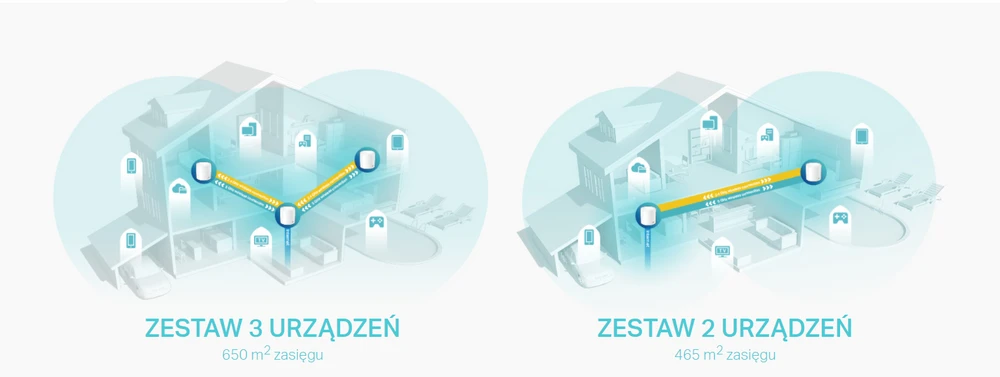
A Wi-FI Mesh system uses multiple indoor devices to create one seamless network. Each one is called a "node" and they all work together to distribute a Wi-Fi signal for your entire home or office. Typically, one node connects to your router via an Ethernet cable, and the other nodes are located in areas where you need Wi-Fi. So you automatically connect to whichever node has the strongest signal, and seamless Wi-Fi Roaming is ensured when you move around.

deco-x60

How does Deco X60 work?

The Deco X60 kit consists of at least two units. Users connect the first Deco unit to an existing modem (router) using a LAN cable, and the other components are placed anywhere in the house. The Deco network automatically switches devices to faster frequency bands (band control) and always connects devices to the strongest signal issued over the Deco network (fast roaming). With in-band data transfer, data can change frequency bands as it travels between Deco and devices - significantly increasing speed.

TP-Link Deco X60: Who is it for?

This Mesh Wi-Fi system is an excellent choice for:
  • People interested in the latest Wi-Fi 6 standard.
  • Users who want perfect security for their home.
  • Those who need a simple Mesh Wi-Fi system that is easy to use and configure.
  • Users who want to control their home network with the Alexa voice assistant.
  • For large houses and apartments that have problems with coverage.
Deco X60

Functions Deco X60

HomeCare

The X60 comes with a lifetime subscription to TP-Link's HomeCare, where you'll find a full suite of parental controls. The Trend Micro-based system prevents your child from accessing adult content, you can also add any URL to the blocked sites list and create visit schedules and time limits.

Seamless roaming with one Wi-FI name

Deco accessories work together to form one unified network. Your phone or tablet automatically connects to the fastest Deco device as you move around the house

QoS

QoS tools to protect against malware include malicious content filtering for all connected devices, intrusion prevention and isolation of infected devices. Homecare QoS settings offer several optimized presets including; Standard, Game, Stream, Surfing, Chat and Custom. Here you can also provide individual customers with high bandwidth priority with specific allocations.

Mobile app

You can manage the X60 via the TP-Link Deco mobile app or via the web console. When you launch the app, you'll see the main overview screen with the network name and its internet status, and a list of currently connected clients.

Technical data Deco X60

Deco X60, being a new system solution from TP-Link, offers us quite a few interesting applications, including Wi-FI 6. The new standard accelerates our Internet up to 3000 MB/s (2402 MB/s in 5GHz band and 574MB/s in 2.4GHz band). Moreover, the manufacturer has used the latest OFDMA and MU-MIMO technologies that significantly increase performance. We should also pay attention to the enhanced WI-FI signal through BBS coloring and Beamforming technology that reduces interferences generated by other wireless networks. According to the manufacturer, the devices of Deco series are compatible with each other and if we want to expand our network in the future, it won't be any problem, as long as we enlarge it with the devices from the manufacturer's line.

From the technical point of view, each Deco X60 unit has been equipped with a quad-core processor working at 1GHz. Additionally, inside you'll also find 512MB of RAM for more stable operation, and 128MB of ROM for storing data. Each accessory is equipped with four internal omni-directional antennas that transmit wireless signals using all modern standards, including Wi-FI 6 (802.11ax).

Construction of Deco X60

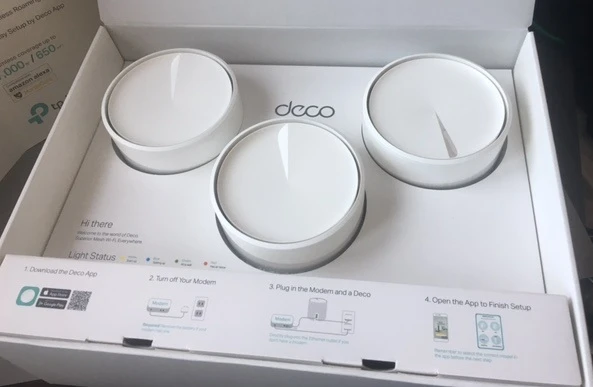
The TP-Link Deco X60 came to us in a small package, on which we can find the features of the tested equipment. Inside there is a cardboard box that protects the devices from damage during transport. Upon opening, our eyes saw three Deco X60 routers, which surprised us pleasantly with their small size. In the box you will find all components needed for the system - three Deco X60 routers, three power supplies, and one RJ-45 cable that will allow you to connect one of the routers to a modem. The manufacturer has put on the inside of the box a quick setup guide. There is also a place for a QR code, using it to download the Deco app to your iOS and Android mobile device.

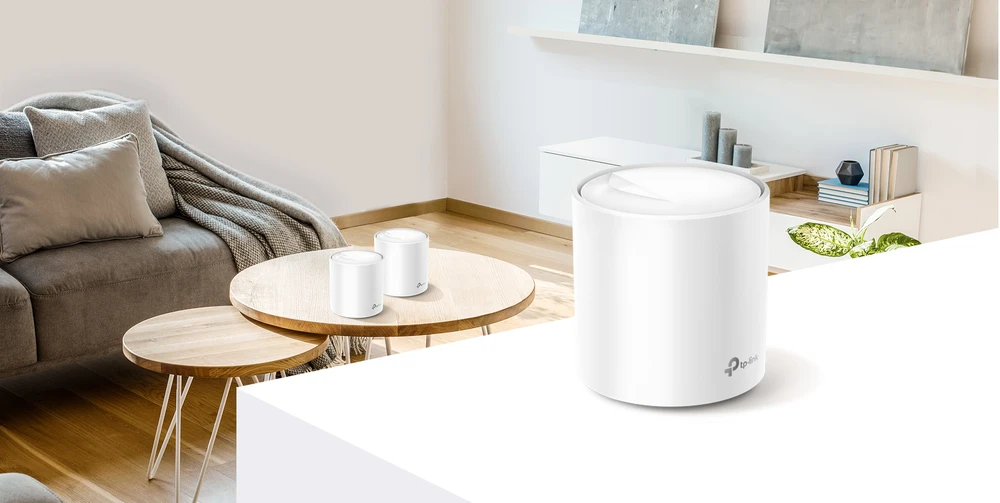
Deco X60 is much smaller than a classic router, and the device itself is made of white matte plastic. The cylindrical shape is visually attractive, thanks to this design TP-Link Deco X60 fits into any kind of interior.

The device is just over 10cm high and can be easily placed on a shelf or cabinet. At the bottom there is a label with the most important information, such as the name of the default Wi-FI network and a reset button, so you can reset the Deco to factory settings. On the back there is a jack and two Gigabit Ethernet ports. On the front of the device, just below the manufacturer's logo, there is a hidden indicator LED that informs us about the operating status.
construction decox60

Deco X60 configuration

Initial setup of the Deco X60 is child's play. All you need to do is plug the Deco into the power supply, then use the included RJ-45 cable to connect your router with the modem. In the next step, run the Deco app on your mobile device. Once registered and logged into the TP-Link cloud, we can proceed to configure our Mesh network. The process takes only a few minutes, usually it comes down to pressing the next button several times and entering the name of the WI-FI network and password.

The application with its good, interesting and clear graphics guides us through the entire configuration process. In this case, even a less advanced user will not have any problems with connecting the device correctly. Once the main Deco router has been configured and connected to the Internet, we can start connecting other devices. To do this, install another Deco X60 in the location of your choice, then after about two minutes the system will automatically detect and add the device to your Mesh network

web GUI DECO

Additional features:

Antivirus

TrendMicro's Homecare module provides access to useful security tools that filter malicious content, prevent intrusions and external attacks, and quarantine infected devices.

Parental controls

A simple cloud-based solution that helps block inappropriate online content on all children's devices. In addition, we can set a limit on the amount of time our kids can spend online.

Quality of Service

Advanced QoS module, helps you easily configure network traffic priorities for gaming, streaming, chatting, browsing or other activities.

Speedtest

You can use it to perform quick speed tests and see how fast your Internet connection is when using the TP-Link Deco X60.

WPA3 encryption

A newer, more secure encryption protocol for wireless networks.

Guest Network

Enable one wireless guest network that broadcasts its signal in the 2.4GHz and 5GHz bands simultaneously.

IPv6

Supports IPv6 addresses that replace IPv4.

Amazon Alexa integration

You can pair Amazon Alexa devices to control the Deco X60 with simple voice commands.

Deco X60 Performance Test

The purpose of our tests is to verify the range of the network in mesh topology, both in terms of signal coverage and real speeds available in the building.

The testing device was a MacBook Pro A1502 with built-in AirPort Extreme wireless card (Broadcom BCM4360 3x3, 1.3 Gbps PHY) working in 802.11a/b/g/n/ac standards.

Before speed testing, we verified the maximum performance of the LAN and iperf3 server. The aforementioned laptop was connected via a 10/100/1000Mbps network card to the switch.

We obtained the following maximum speeds for a single TCP stream:

  • Download: 894Mbps.
  • Upload: 958Mbps.

Accesspoints Deco-1, Deco-2 and Deco 3 were connected to each other in Mesh mode only, i.e. wireless only.

Signal Map

To make a signal map we used AirSurvey software, to read the signal levels correctly pay attention to the color legend at the bottom of the picture. The location of the access points is marked with an icon. The device on the ground floor was connected to the switch via Ethernet 1Gbps port.

Speed tests

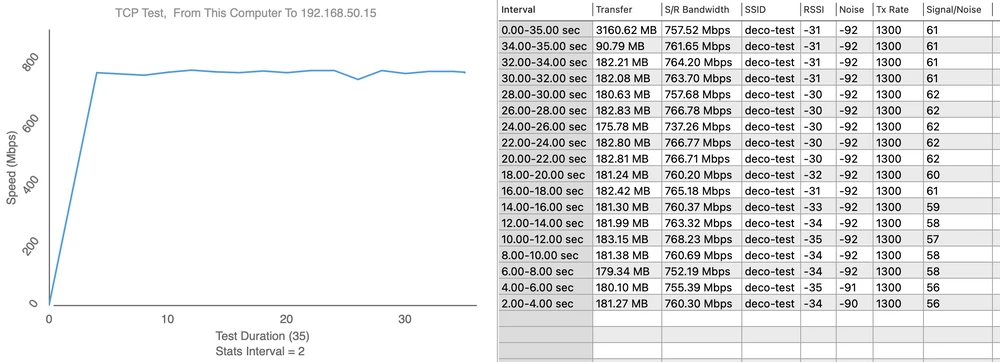
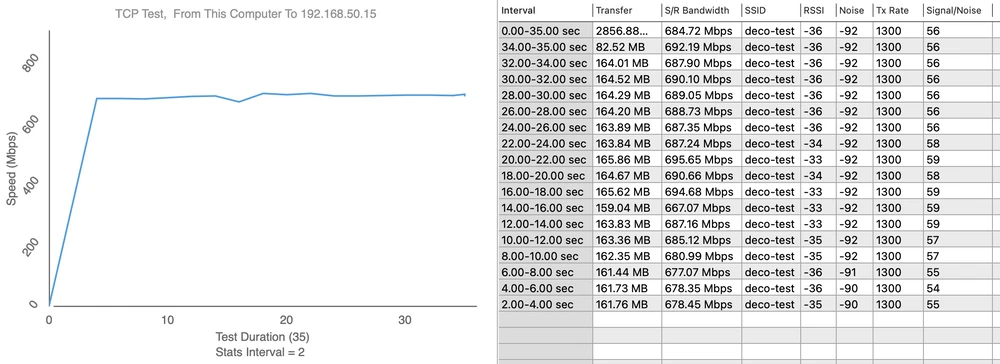
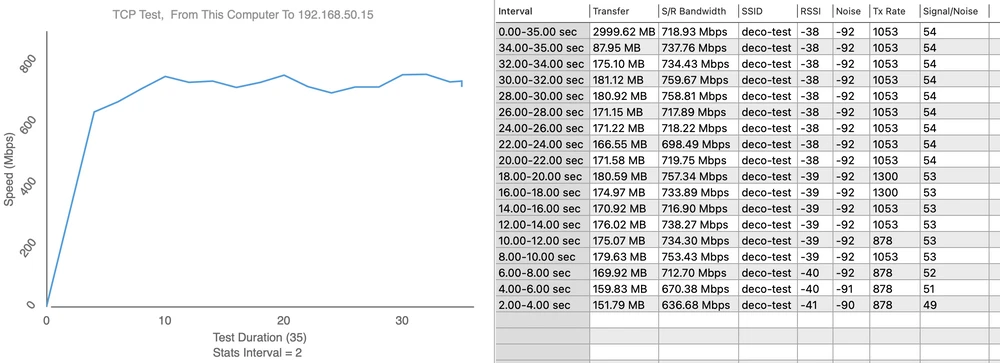
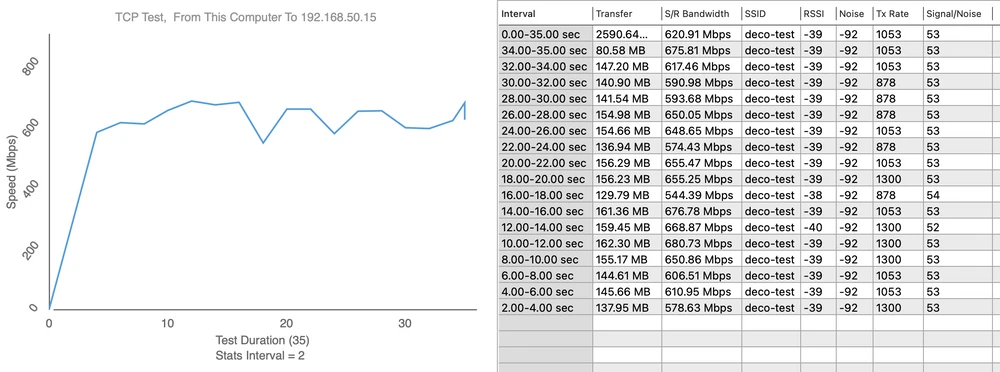
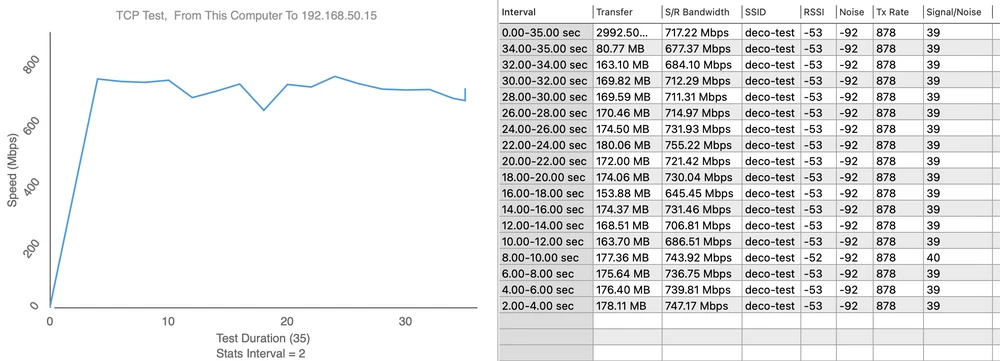
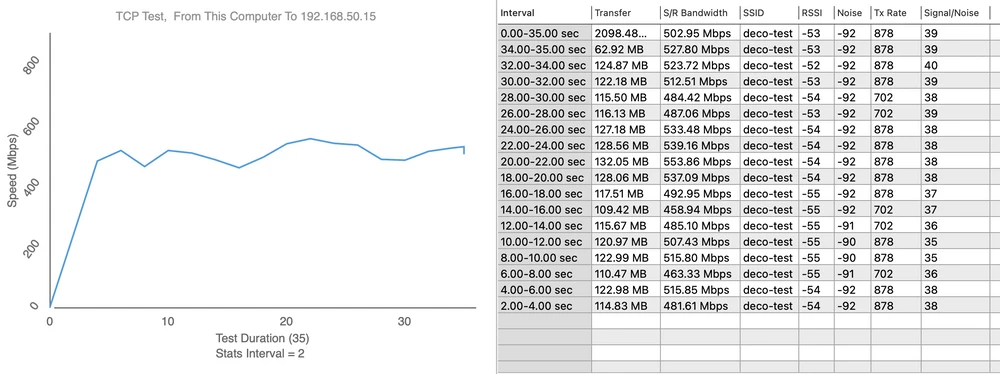
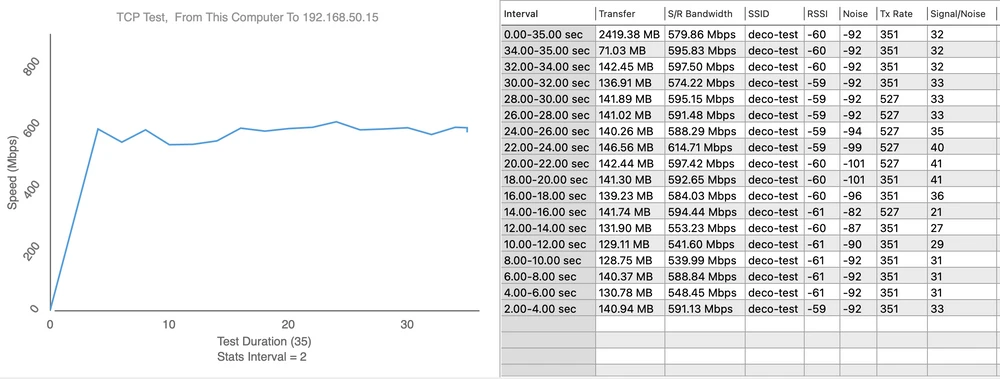
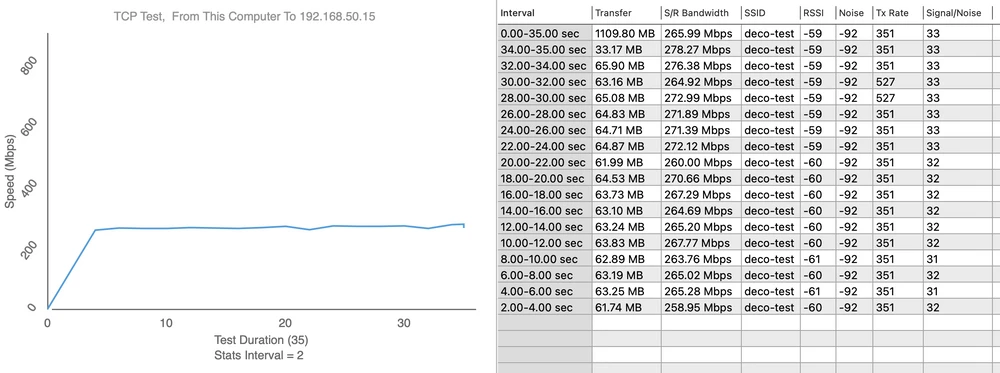
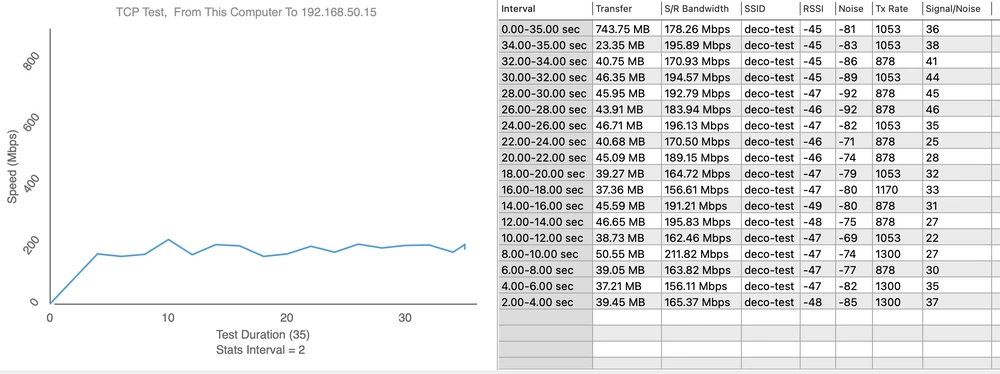
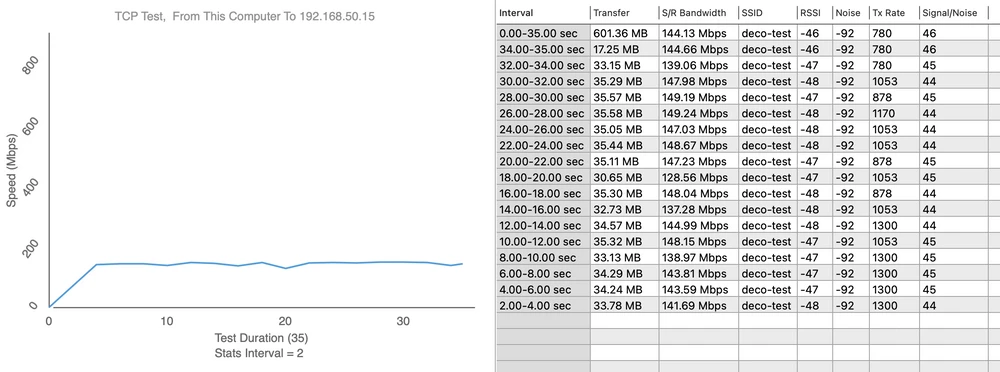
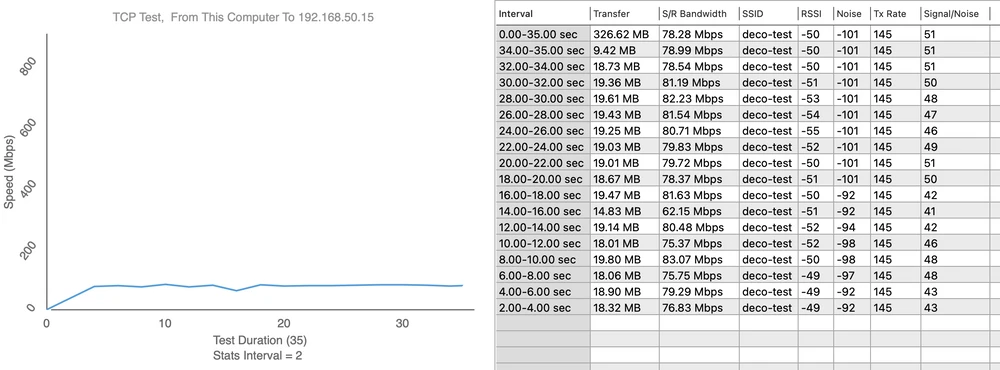
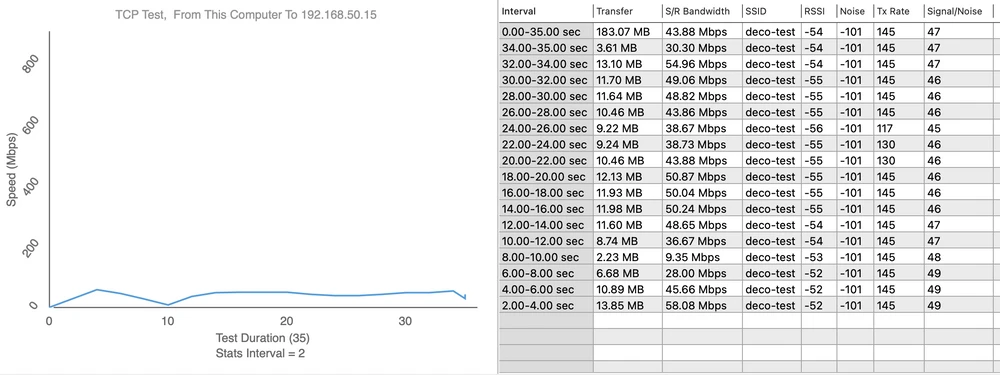
We performed speed tests using WiFiPerf software, and the speed test server was iperf3 software.
  • Measurement point No. 1
Download 768Mbps
Deco x60 speed test
Upload 695Mbps
Deco X60 Speed Test
  • Measurement point No. 2
Download 758Mbps
Speed test
Upload 678Mbps
deco X60 speed test
  • Measurement point No. 3
Download 755Mbps
Deco X60 - test
Upload 537Mbps
Deco - speed test
  • Measurement point No. 4
Download 614Mbps
Deco X60 speed test
Upload 278Mbps
Deco X60 speed test
  • Measurement point No. 5
Download 196Mbps
Deco X60 speed test
Upload 149Mbps
Deco X60 - speed test
  • Measurement point No. 6
Download 83Mbps
Mesh Deco X60 Speed Test
Upload 58Mbps
deco x60 speed test

Summary

TP-Link Deco X60 is an ideal Mesh WI-FI system that allows us to enjoy the latest WI-FI 6 (802.11ax) standard. The device is equipped with solid components and a simple mobile application that we can use to configure and manage the network. The available security tools and parental controls are of the highest level, as is the maximum speed that the Deco X60 achieves. Another positive aspect is that the hardware can be used with other Deco devices, so we can easily expand our existing network. If you are looking to jump into a new Wi-FI 6 network and are looking for a Mesh WI-FI system then you should consider buying the TP-Link Deco X60.
Pros:
  • Very easy configuration.
  • The devices work very smoothly switching between each other.
  • Stylish and attractive design.
  • The device works very well in small to medium sized apartments or offices.
Disadvantages:
  • Price.
  • The devices have a small problem with operating between each other at greater distances.
  • Configuration only with the mobile application.
Loading...