



UniFi Network 9.1 - News and Enhancements

Ubiquiti never stands still and is constantly striving to improve its products - both in terms of software and hardware. The company innovates every day to simplify network management and provide an even higher quality of service. Now, with the latest release of UniFi Network 9.1, users can look forward to a number of improvements that range from performance optimization to the introduction of new diagnostic features. In this version, real-time traffic visibility functionality has been improved, QoS configuration for critical applications has been enhanced, and modern WiFi diagnostic tools have been added.
YOUTUBE
New Features of UniFi Network 9.1
1. Real-Time Traffic Visibility
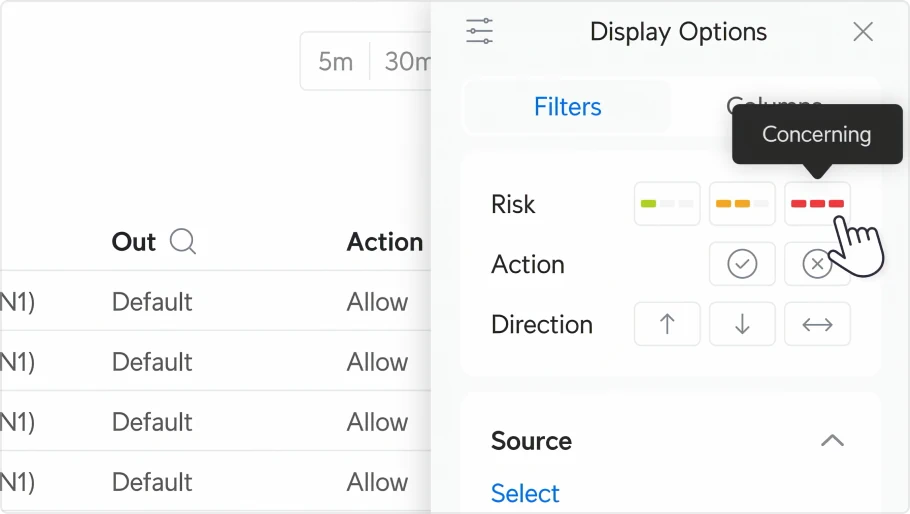
See every flow on your network, easily filtering out threats, blocked traffic or local flows - all in an elegant and transparent layout.
See every flow on your network, easily filtering out threats, blocked traffic or local flows - all in an elegant and transparent layout.
2 Improved QoS for Critical Applications
Now easier to configure voice chat applications with additional traffic shaping options for advanced users.
Now easier to configure voice chat applications with additional traffic shaping options for advanced users.

3 New Features of UniFi Mobile App
The UniFi mobile app has been enhanced with new features such as accurate real-time performance measurement and upgraded device tables.
The UniFi mobile app has been enhanced with new features such as accurate real-time performance measurement and upgraded device tables.

4. Airview - Advanced WiFi Diagnostics
Airview's diagnostic panel provides real-time WiFi metrics, tables of neighboring APs and device event logs for quick analysis.
Airview's diagnostic panel provides real-time WiFi metrics, tables of neighboring APs and device event logs for quick analysis.

5. SFP Analyzer
The new SFP Analyzer provides a complete, unified view of all connected optics, facilitating management and diagnosis.
The new SFP Analyzer provides a complete, unified view of all connected optics, facilitating management and diagnosis.

6 Replacing Devices Remotely
Site Manager's Remote Device Replacement feature allows you to easily replace UniFi devices without being physically present.
Site Manager's Remote Device Replacement feature allows you to easily replace UniFi devices without being physically present.

7 Last Connected Device
This new feature allows you to quickly view the device that was last connected to a port. It gives you an easy way to see what has been connected, making it easier to manage your network and diagnose devices on your system. Visualizing the last device gives you instant insight into the current status of the port.
This new feature allows you to quickly view the device that was last connected to a port. It gives you an easy way to see what has been connected, making it easier to manage your network and diagnose devices on your system. Visualizing the last device gives you instant insight into the current status of the port.

Summary
The UniFi Network 9.1 version introduces a number of significant improvements that will streamline network management. With new features such as QoS, real-time traffic visibility, WiFi diagnostics and remote device replacement, users can now manage their network even more easily, improving performance and security.
Upgrade your network now and use these advanced tools to improve your organization's quality of service.
Upgrade your network now and use these advanced tools to improve your organization's quality of service.